LightBlog

dimanche 30 août 2020

T-Mobile OnePlus 7T, 7T Pro McLaren Edition can now be bootloader unlocked without waiting, 7T rebranding also possible

The bootloader unlocking experience on a T-Mobile-branded OnePlus smartphone is very much different from the unlocked variants. Once you pay off the contract and use the device on the network for at least 40 days, you’re eligible to perform a SIM unlock. After SIM unlocking, you need to generate a unique unlock token to be able to unlock the bootloader. Besides the added complexity of bootloader unlocking, the slower update frequency and the inability to participate in the OxygenOS Open Beta and Developer Preview programs are some of the main reasons why people prefer to “rebrand” their T-Mobile OnePlus phones to international (i.e. non-T-Mobile) firmware. If you have the T-Mobile OnePlus 7T and want to get rid of the carrier firmware, then you’ll be interested in learning that XDA Senior Member Superboy58 has managed to find a way to convert this variant to international without a traditionally unlocked bootloader/SIM unlock.

OnePlus 7T Forums

The trick is to patch the OPS file from the official unbrick package in such a way that the bootloader ignores the token generation part and allows users to unlock it with a standard Fastboot command. As soon as you unlock the bootloader, pick the Fastboot-flashable global firmware for the OnePlus 7T and do a clean flash to complete the rebranding process. Head over to the thread linked below for more instructions.

Rebrand T-Mobile OnePlus 7T to international firmware — XDA Thread

In case you have the T-Mobile OnePlus 7T Pro McLaren Edition, there’s a similar mod to unlock the bootloader without waiting. The only catch is, you can’t rebrand it like the other model. The T-Mobile variant is 5G capable, whereas an international variant of the OnePlus 7T Pro 5G simply does not exist. There is no way you can replace the stock T-Mobile McLaren Edition firmware with another official OxygenOS ROM. You can, however, opt for custom ROMs that are specifically built for this model.

Bootloader unlock T-Mobile OnePlus 7T Pro McLaren Edition without waiting

T-Mobile OnePlus 7T Pro McLaren Edition Forums

The post T-Mobile OnePlus 7T, 7T Pro McLaren Edition can now be bootloader unlocked without waiting, 7T rebranding also possible appeared first on xda-developers.


from xda-developers https://ift.tt/34LxLhz
via IFTTT

Google Pixel 5, Pixel 4a 5G, Samsung Galaxy S20 FE, Galaxy M51, and Nubia Red Magic 5S forums are open

It’s been a busy month for smartphone releases, and there are no signs of that slowing down. After opening up forums for the ZenFone 7, Moto G9, and two new Realme devices, we’re opening up the floodgates for more devices for people to chat about. Our forums for the Google Pixel 5, Google Pixel 4a 5G, Samsung Galaxy S20 FE, Samsung Galaxy M51, and Nubia Red Magic 5S are all open.

Google Pixel 5

Not long after Google teased the Pixel 5, some big leaks hit the web. In addition to a series of renders, nearly all of the specs of the Google Pixel 5 were revealed, including the battery size, RAM, and more. In other words, there’s not much we don’t know about the Pixel 5, except maybe the price. Google is expected to officially unveil the Pixel 5 towards the beginning of October.

Google Pixel 5 Forums

Google Pixel 5 leaked renders

Alleged Google Pixel 5 CAD render. Source: @OnLeaks/Pricebaba.

Google Pixel 4a 5G

In addition to the Google Pixel 5, Google is also gearing up to introduce the Pixel 4a 5G. The device is expected to be a step up from the Pixel 4a and includes support for 5G which, as you’d expect, will demand a higher price tag. Some of the device’s specs were already unveiled, and there’s even been a leaked picture, so there’s not much else to do but wait for Google to unveil it alongside the Google Pixel 5 in October.

Google Pixel 4a 5G Forums

Alleged Google Pixel 4a 5G CAD render. Source: @OnLeaks/91Mobiles

Samsung Galaxy 20 FE

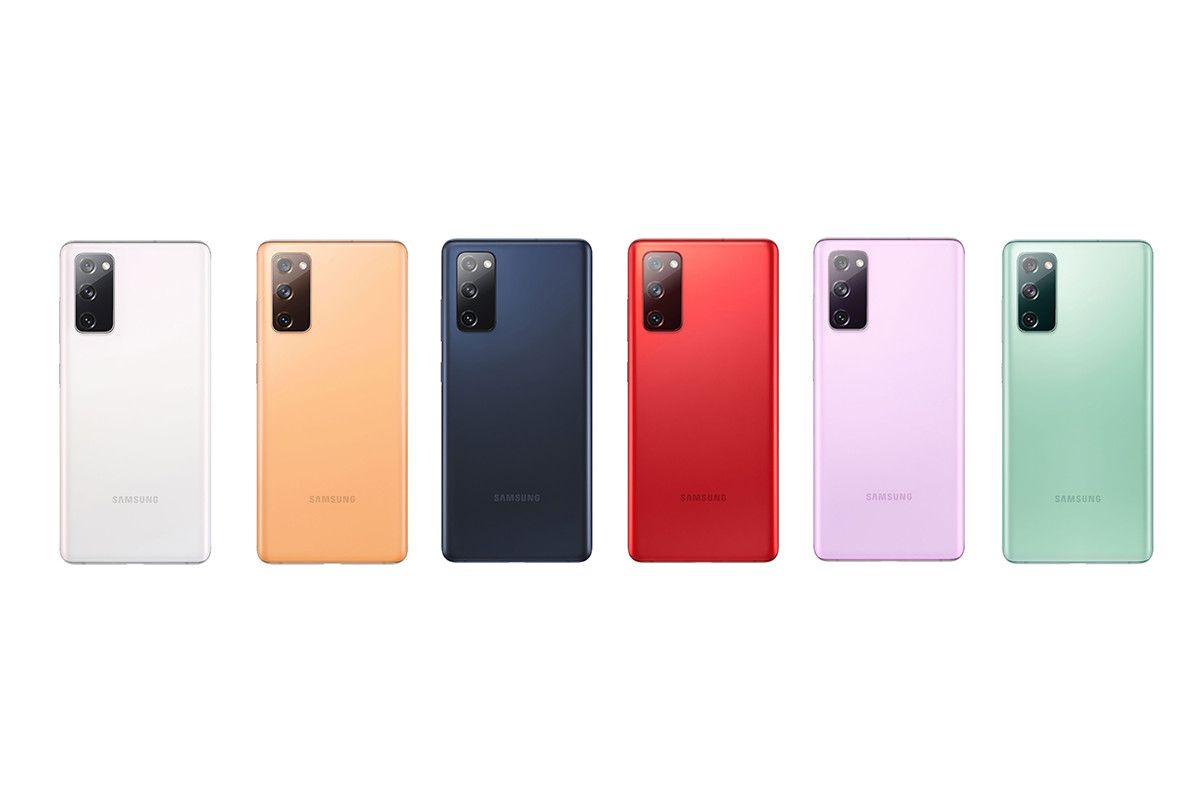
Samsung has announced the new Galaxy Note 20 series, but the company isn’t done yet with the Galaxy S20 series. The company is allegedly prepping the Galaxy S20 “Fan Edition,” which is expected to feature a tweaked design and support 5G when it launches in the U.S. There are a number of other leaks and rumors about this device, which you can discuss freely in the forums.

Samsung Galaxy 20 FE Forums

Alleged Samsung Galaxy S20 FE press render. Source: Evan Blass

Samsung Galaxy M51

Big batteries have become commonplace in today’s smartphone market, but the Samsung Galaxy M51 will allegedly take it to the next level. Recent reports claim the device, which may include Qualcomm’s mid-range Snapdragon 730 chip, will feature a massive 7,000mAh battery, which should be plenty of juice to last through a day or two.

Samsung Galaxy M51 Forums

Alleged Samsung Galaxy M51 press render. Source: @Sudhanshu1414

Nubia Red Magic 5S

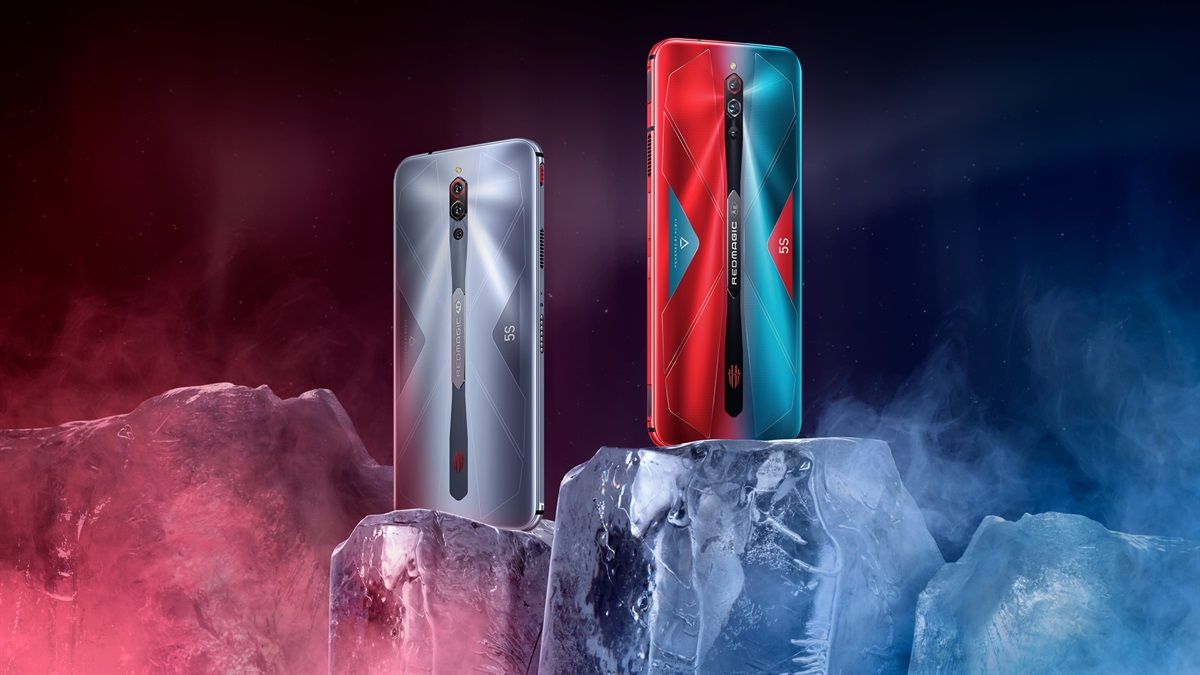
Looking to get your game on? Look no further than the Nubia Red Magic 5S. The gaming smartphone comes equipped with a Qualcomm Snapdragon 865 chip, 144Hz OLED display, and a triple-camera setup, rounding out what should be a pretty impressive flagship device. And it costs a respectable $579, making it an affordable yet powerful experience all around.

Nubia Red Magic 5S Forums


Are you looking forward to the Google Pixel 5, Google Pixel 4a 5G, Samsung Galaxy S20 FE, or Samsung Galaxy M51? Thinking of picking up the Nubia Red Magic 5S? Let us know your thoughts in the comments below!

The post Google Pixel 5, Pixel 4a 5G, Samsung Galaxy S20 FE, Galaxy M51, and Nubia Red Magic 5S forums are open appeared first on xda-developers.


from xda-developers https://ift.tt/3lv8dLy
via IFTTT

samedi 29 août 2020

BraveDNS is an open-source DNS-over-HTTPS client, firewall, and adblocker for Android

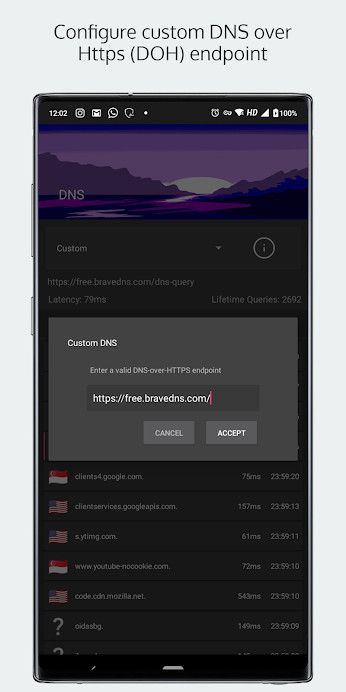
Replacing the factory-installed OS with an aftermarket ROM isn’t just limited to the Android ecosystem. People started modding Linux-powered wireless routers and access points long before the rise of Android smartphones in order to enable functionalities such as packet filtering, firewalls, or adblocking that aren’t otherwise present in the stock firmware. Unsurprisingly, such features are much requested in the world of Android as well. While it is possible to configure Private DNS (or DNS-over-HTTPS) and subsequently block ads on an Android device since Android Pie, end-users still need to rely on third-party apps to set up a proper firewall. If you are looking for an all-in-one app that can act as a firewall, adblocker, and even a DNS-over-HTTPS client, BraveDNS might interest you.

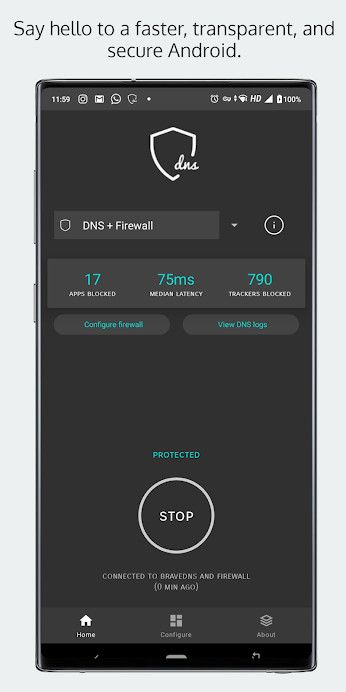
The name “BraveDNS” might sound like yet another DNS resolver service, but it is certainly more than that. This free and open-source app describes itself as “an OpenSnitch-inspired firewall and network monitor + a pi-hole-inspired DNS over HTTPS client with blocklists”. The DoH client module, which is mostly based on another popular open-source project named Intra, uses AdGuard DNS as the default endpoint with built-in adblocking support. The developer team also offers their own DNS resolver service as a paid option for those who need features like custom blocklists, allowlists, the ability to store DNS logs for later analysis, etc.

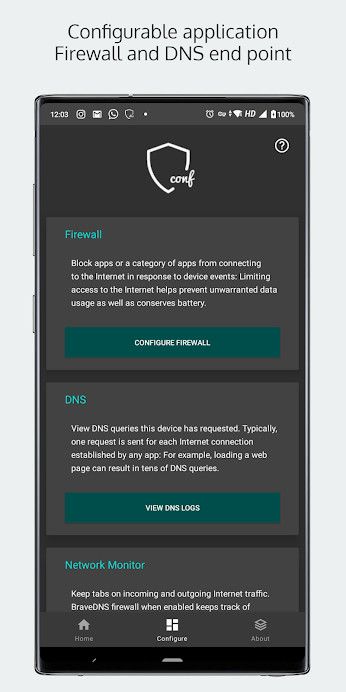
Below you can find a list of features that are currently offered by the app:

  1. DNS over HTTPS (circumvent censorship and prevent surveillance of DNS logs by ISPs and everyone else).
  2. View DNS logs.
  3. Ad-block through Adguard DNS.
  4. Firewall by app categories.
  5. Firewall individual apps.
  6. Firewall when apps are in the background (not-in-active-use).
  7. Firewall when device is locked.
bravedns_1 bravedns_2 bravedns_3 bravedns_4

The initial version of BraveDNS requires at least Android Oreo, but the developers have plans to make it compatible all the way down to Android Marshmallow in the near future. Moreover, support for dual-mode DNS and firewall execution is promised to be backported to legacy Android versions.

You can download the BraveDNS app on your device from the Play Store link below, or grab the APK from their official site.

BraveDNS: GitHub Repo ||| XDA Forum Thread

BraveDNS: Fast, private, and safe DNS + Firewall (Free, Google Play) →

The post BraveDNS is an open-source DNS-over-HTTPS client, firewall, and adblocker for Android appeared first on xda-developers.


from xda-developers https://ift.tt/3gFQiyj
via IFTTT

This app uses root access to let you control the ASUS ROG Phone II’s RGB logo

The ASUS ROG Phone II already has a successor for this year, but the 2019 gaming flagship still packs some serious punch. Its powerhouse specifications include the Qualcomm Snapdragon 855+ chipset, up to 12GB of RAM, up to a whopping 1TB of internal storage, a behemoth 6,000 mAh battery, and a buttery smooth 120Hz AMOLED display. The ROG Phone II also has a developer-friendly OEM, which means you can try out plenty of mods and custom ROMs on this smartphone. If you’re running a custom ROM, though, you may have noticed the lack of RGB controls for the ROG Phone II’s “Republic of Gamers” logo. Thankfully, there’s a new app in town with which you can control the RGB illumination, even when you’re running a custom ROM.

ASUS ROG Phone II XDA Forums

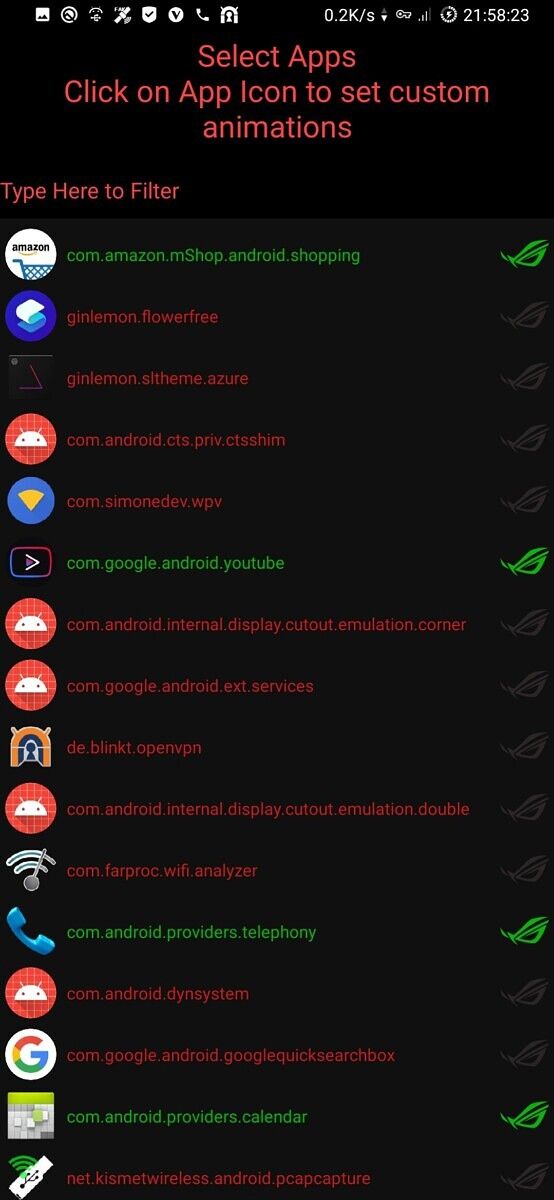
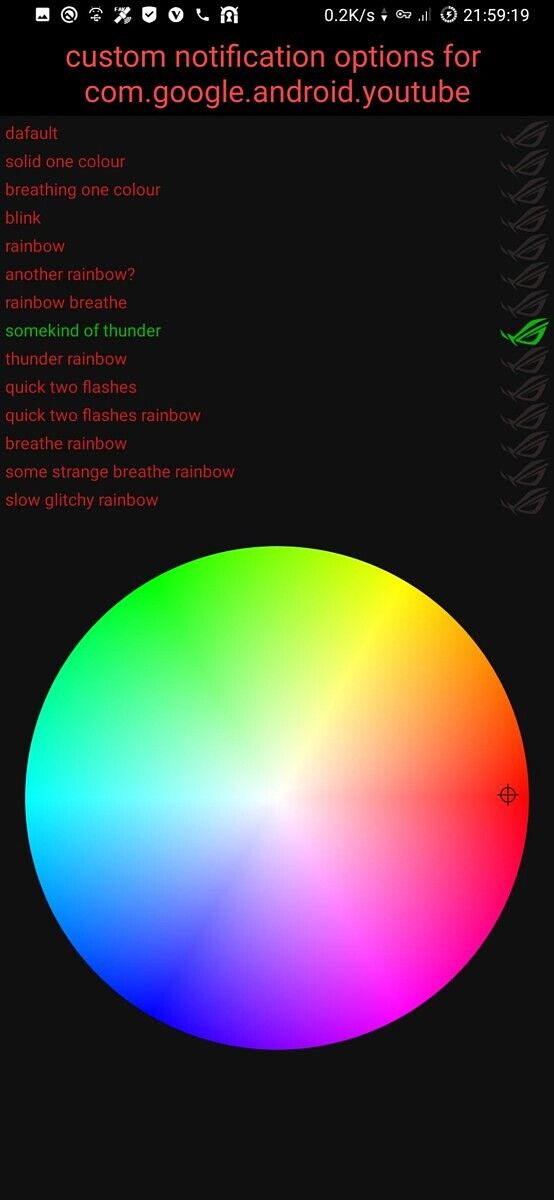
XDA Junior Member Terminal_Heat_Sink has developed this app that not only allows you to customize the illumination pattern on the ROG logo on a per-app basis but also gives you the ability to utilize the second LED for notifications. Named “Asus ROG Phone 2 RGB”, the app internally hooks into the RGB driver, which is why root access is a prerequisite for using it. According to the developer, the app does work on the stock ROM as well, but you must upgrade to the official Android 10 firmware to ensure full compatibility.

asus_rog_phone_ii_rgb_1 asus_rog_phone_ii_rgb_2 asus_rog_phone_ii_rgb_3

Below you can find the list of custom animations supported by the app. Note that the color wheel doesn’t work with all of them.

  1. None
  2. Solid one color
  3. Breathing one color
  4. Blink
  5. Rainbow 1
  6. Rainbow 2
  7. Rainbow breathe
  8. Thunder
  9. Thunder rainbow
  10. Quick two flashes
  11. Quick two flashes rainbow
  12. Breathe rainbow 1
  13. Breathe rainbow 2
  14. Slow glitchy rainbow
  15. Yellow light

ASUS ROG Phone II RGB: Download ||| Source Code ||| XDA Discussion Thread

The app is coded in such a way that you don’t have to set up all of the settings for custom notifications each time you reinstall it. There is an option to export all the settings to a file named .terminal_heat_sink.asusrogphone2rgb.xml which you can find at the root of the internal storage. To import, just place the XML file in the same location and use the “Import Settings” wizard inside the app.

The post This app uses root access to let you control the ASUS ROG Phone II’s RGB logo appeared first on xda-developers.


from xda-developers https://ift.tt/31EoxSk
via IFTTT

vendredi 28 août 2020

Google deprecates its App Preview Messaging feature occasionally used by Photos and Duo

When Google introduced Allo in 2016, the company also detailed a feature for developers of messaging apps known as App Preview Messaging. This feature was aimed at allowing users to send a message from their favorite messaging app to any contact in their phonebook (provided both the sender and the recipient are using an Android device), even if the recipient of the message doesn’t have the app installed. So, say you try starting a Duo video chat with a friend. If your friend doesn’t have Duo installed on their Android phone, they’d get a notification prompting them to download it thanks to App Preview Messaging. The feature is even set up to give users the ability to reply to the message without installing the app! Google employed this feature in Allo (which no longer exists), Duo, and Photos to get people to sign up for these services.

Unfortunately, the feature seems to have fallen by the wayside, never graduating from early access despite Google’s promises to open it up. It’s unclear if any non-Google app ever used the feature in the first place. Regardless, Google recently updated the developer documentation for App Preview Messaging to announce that the early access program has ended and the feature is being deprecated (via AndroidPolice). The page now says that, “as of Q3 2020, this program is complete, and users can no longer send messages with App Preview Messaging.”

Users have always been able to turn off App Preview Messaging in Settings > Google > Data & messaging or block these notifications entirely. Now that the early access period is complete, though, these user settings will be removed from Google Play Services. Google recommends developers turn to Business Messages as an alternative.

The post Google deprecates its App Preview Messaging feature occasionally used by Photos and Duo appeared first on xda-developers.


from xda-developers https://ift.tt/3b6T0f5
via IFTTT

Google Phone app rolls out a new “Flip to Silence” setting for non-Pixel phones

Back in April, we spotted a new feature in development for the Google Phone app called “Flip to Silence.” This feature is supposed to let users silence the ringtone from an incoming phone call by flipping the phone over. When we examined the code for this feature, we determined that the setting will only show up on devices that don’t support Digital Wellbeing’s “Flip to Shhh” feature. That means it can only show up on non-Pixel devices with the Google Phone app installed. Today, the setting started to show up for many users, but the feature doesn’t seem to actually work just yet.

We were first tipped off by Twitter user @TheTweetofVidd about the “Flip to Silence” setting showing up. The user spotted the setting on their Redmi Note 5 Pro running the Pixel Experience custom ROM. On Twitter, users with the Essential Phone, Samsung Galaxy Note 20 Ultra, iQOO 3, Redmi Note 5A, ASUS ZenFone 6, and POCO F1 spotted the setting in the Google Phone app. I also noticed it on my own OnePlus Nord review unit, though sadly, the feature didn’t work when I actually tried it.

Google Phone app Flip to Silence Google Phone app Flip to Silence

The “Flip to Silence” setting can be found in the new Settings > Advanced submenu. Screenshot credits: @TheTweetofVidd

Earlier this month, Google made the Phone app installable on basically any non-Pixel device. Before then, it only came pre-installed on Pixel phones, Android One phones, and certain devices like the OnePlus Nord. Once the new “Flip to Silence” feature actually starts working, users who don’t have Digital Wellbeing’s “Flip to Shhh” feature, which is only available on the Pixel 2, Pixel 3, Pixel 3a, Pixel 4, and Pixel 4a, can turn their phone over to silence incoming phone calls. Some OEMs have this feature baked into their custom Android skins, but it’s nice to see Google add it to their dialer app for anyone to enjoy.

Phone (Free, Google Play) →

The post Google Phone app rolls out a new “Flip to Silence” setting for non-Pixel phones appeared first on xda-developers.


from xda-developers https://ift.tt/3lAJeXt
via IFTTT

Zepp, formerly Amazfit, launches the Zepp E smartwatches in the US and UK

Huami-owned Amazfit is a well-known maker of smart wearable accessories, but the company recently decided to rebrand itself as Zepp. Besides a new name and logo, nothing is changing for existing owners of Amazfit wearables. Moving forward, though, any future products the company launches will be under the Zepp brand. The first wearables under the new brand are the Zepp E Square and Zepp E Circle. These new smartwatches are billed as complete wellness devices, offering sleep tracking, heart rate monitoring, and bloody-oxygen saturation monitoring (with an SpO2 sensor).


Zepp E comes in two different designs: Zepp E Circle and Zepp E Square. They’re essentially the same devices but they feature slightly different screen sizes and shapes. The Circle features a 1.28″ AMOLED display at 416×416 resolution while the Square features a larger 1.65″ AMOLED display at 348×442 resolution. Both designs are made on stainless steel but come with different band colors and materials. While both the Circle and Square offer a leather band in “Polar Night Black” or “Moon Grey” and a fluoroelastomer band in “Onyx Black”, the Square gets a unique “Deep Sea Blue” leather band, “Pebble Grey” fluoroelastomer band, and “Metallic Black Special Edition” while the Circle gets its own unique “Ice Blue” fluoroelastomer band and “Champagne Gold Special Edition.”

One of Zepp E’s headlining features is the ability to track a wearer’s sleep stages, including light sleep, deep sleep, Rapid Eye Movement (REM), and awake time. The devices can even monitor your naps. Zepp then provides users with a sleep score, which users can use to take actionable steps to improve their sleep quality.

Both smartwatches also come equipped with a heart-rate sensor, which is common among today’s biggest wearables. However, Zepp is trying to differentiate its devices by using the heart-rate sensor to provide wearers with information about stress. The company said this stress-monitoring feature will come in a future OTA upgrade.

The Zepp E series also features 11 sports modes, including walking, indoor and outdoor running, cycling, swimming, climbing, and more. The smartwatches are graded for up to 5 ATM of water resistance but don’t have GPS for location tracking.

Even with all the different sports modes and tracking abilities, Zepp promises up to 7 days of typical battery life with the Zepp E thanks to a 188mAh battery. They can last a bit longer (up to 15 days) with the basic watch mode, though. The smartwatches take about 2 hours to fully charge and are charged by connecting to the 2 Pin Pogo Pin connector on the magnetic charging base.  This kind of battery life isn’t typical of Wear OS smartwatches, so you shouldn’t be surprised to hear that the Zepp E smartwatches run Zepp’s proprietary smartwatch OS. The OS offers five watch faces built-in, though more can be downloaded from the Zepp app.

Zepp (formerly Amazfit) (Free, Google Play) →

There are a lot of wearables on the market, but the Zepp E series seem like solid options from a reputable company. It’s also nice that it comes in both square and circle designs, letting consumers choose their preferred style. Consumers can purchase the Zepp E series for $249 right now in the U.S. If you’re in the UK, the wearables will retail for £209 starting September 1.

Pre-order the Zepp E: U.S. ||| U.K.

Zepp E specs

The post Zepp, formerly Amazfit, launches the Zepp E smartwatches in the US and UK appeared first on xda-developers.


from xda-developers https://ift.tt/3jo3wBh
via IFTTT