LightBlog

mercredi 30 septembre 2020

OnePlus rolls out new OxygenOS stable builds for the OnePlus Nord and OnePlus 7 series with September 2020 patches

OnePlus has a commendable track record of pushing Android security updates for its devices. The company usually ships the latest Android security patches from Google to its current-gen flagships within days of their release, with similar updates for older devices following shortly thereafter. However, since the company is currently pushing OxygenOS 11 Open Beta builds for the OnePlus 8 series, it’s yet to ship the September security patches to the devices on the stable channel. Thankfully, that’s not the case for other devices in the company’s portfolio as they’ve now started receiving the September security patches with the latest OxygenOS stable update.

OxygenOS 10.5.8 for the OnePlus Nord

As per a recent post on the OnePlus Community forums, the company has started rolling out OxygenOS 10.5.8 for its mid-range OnePlus Nord. As mentioned earlier, the update includes the Android security patches for September 2020, along with a few other improvements. Here’s the complete changelog for the latest OxygenOS stable release for the device:

  • System
    • Newly added “Hide silent notifications in status bar” feature to filter unimportant notifications, making the app notification management easier (Route: Settings>Apps & Notifications> Notifications> Advanced> Hide silent notifications in the status bar)
    • Optimized the expanded screenshot user experience for some scenes
    • Fixed known issues and improved system stability
    • Updated Android security Patch to 2020.09
  • Camera
    • Optimized image stabilization performance
  • Display
    • Improved general display calibration
  • Network
    • Optimize the network stability

OnePlus Nord XDA Forums

OxygenOS 10.0.8 (EU)/10.3.5 (India & Global) for the OnePlus 7 series

OnePlus’ flagship OnePlus 7 series from last year is also getting a similar update on the stable channel. The update includes the Android security patches for September 2020, a new user assistance feature, optimizations to the power consumption on the OnePlus 7 Pro, and more. Here’s the complete changelog for the latest OxygenOS stable release for the devices:

  • System
    • Newly added user assistance feature to help user master usage skills quickly (Route: Settings>OnePlus Tips&Support)
    • Optimized power consumption of the system and improve user experience (OP7 Pro Only)
    • Fixed the flashback issue with some third-party apps
    • Fixed known issues and improved system stability
    • Updated Android Security Patch to 2020.09

OnePlus 7 XDA Forums || OnePlus 7 Pro XDA Forums

As with all OxygenOS stable releases from OnePlus, the latest updates for the OnePlus 7 series and the OnePlus Nord will be rolled out to users in a staged fashion. This means that the updates will first reach only a handful of users today. Once the company confirms that there are no major issues with the update, it should roll out to more users.

OnePlus 7T Pro McLaren 5G SA update

Along with the aforementioned updates, the company is also rolling out OxygenOS 10.0.39.HD61CB for the OnePlus 7T Pro McLaren Edition. As per a recent post from XDA Member fixit35, the update brings support for 5G SA to the device, Android security patches for August 2020, and general improvements and bug fixes.

In case you don’t wish to wait for the latest OTA updates for your device, we’ve managed to procure download links for the flashable .zip files. As of now, we have access to the update packages for the OnePlus Nord only. We will update this post with the other download links as soon as we get a hold of them.

Downloads

  • OxygenOS 10.5.8 for the OnePlus Nord:
  • OxygenOS 10.0.8 (EU)/10.3.5 (India& Global) for the OnePlus 7:
    • Global
      • Full OTA
      • Incremental OTA from OxygenOS 10.3.4
    • Europe
      • Full OTA
      • Incremental OTA from OxygenOS 10.0.7
    • India
      • Full OTA
      • Incremental OTA from OxygenOS 10.3.4
  • OxygenOS 10.0.8 (EU)/10.3.5 (India& Global) for the OnePlus 7 Pro:
    • Global
      • Full OTA
      • Incremental OTA from OxygenOS 10.3.4
    • Europe
      • Full OTA
      • Incremental OTA from OxygenOS 10.0.7
    • India
      • Full OTA
      • Incremental OTA from OxygenOS 10.3.4

Source: OnePlus Community forums (1,2)

Thanks to XDA Senior Member Some_Random_Username for the download links!

The post OnePlus rolls out new OxygenOS stable builds for the OnePlus Nord and OnePlus 7 series with September 2020 patches appeared first on xda-developers.


from xda-developers https://ift.tt/3jo7jz2
via IFTTT

Kernel sources for the POCO M2 Pro/Redmi Note 9S/9 Pro/9 Pro Max, Moto G9/G9 Play, Realme C11/C12/C15, and Realme V3/V5/X7/X7 Pro are now available

There is a direct correlation between the developer-friendliness of a particular Android OEM and their stance on publishing the kernel source code for the smartphones they sell. The companies are obliged to provide the source code – upon request – for any Linux kernel binaries that ship on their devices to comply with the requirements of the GNU General Public License (GPL) v2. A handful of manufacturers are known for releasing such sources in a timely manner. Xiaomi is one of the most notable names in this field, and the OEM has now refreshed its official GitHub repository with the kernel source code corresponding to a bunch of popular phones. Moreover, sources for the recently released Motorola Moto G9/G9 Play as well as several Realme phones are now available for download.

Redmi Note 9S, 9 Pro, 9 Pro Max and POCO M2 Pro

As of now, Xiaomi’s product portfolio contains four distinct Qualcomm Snapdragon 720G-powered smartphones. The list consists of the Indian Redmi Note 9 Pro, also known as the global Redmi Note 9S (code-name: “curtana”), the global Redmi Note 9 Pro (code-name: “joyeuse”), the Redmi Note 9 Pro Max (code-name: “excalibur”), and the POCO M2 Pro (code-name: “gram”). The OEM prefers to maintain separate firmware packages for these devices, but their kernel sources are unified due to the internal similarities. You can find the kernel source code tree for them under the “gram-q-oss” branch of Xiaomi’s Github repo.

Redmi Note 9S/9Pro/9 Pro Max/POCO M2 Pro Kernel Sources

XDA Forums: Redmi Note 9S/9 Pro ||| Redmi Note 9 Pro Max ||| POCO M2 Pro

Motorola Moto G9 and Moto G9 Play

The Moto G9 launched back in August with the Qualcomm Snapdragon 662 SoC and Android 10 on board. Later on, Motorola released the same phone under the Moto G9 Play moniker across Europe with the addition of a dedicated Google Assistant button. As expected, the source for the device duo (code-name: “guamp”) is unified. The package linked below corresponds to software version QPX30.30-Q3-38-20.

Motorola Moto G9/G9 Play Kernel Sources

XDA Forums: Moto G9 ||| Moto G9 Play

Realme C11, C12, C15

Kernel sources for the Realme C11, Realme C12, and the Realme C15 are now up for grabs. All of them feature MediaTek’s Helio G35 chipset and have the same code-name (“RMX2185”).

Realme C11/C12/C15 Kernel Sources

XDA Forums: Realme C11 ||| Realme C12 ||| Realme C15

Realme V3, V5, X7, and X7 Pro

Lastly, we have a couple of other MediaTek-laden phones from Realme. The Realme X7 comes with the Dimensity 800U, while the Realme X7 Pro carries the Dimensity 1000 Plus SoC. The Realme V3 and V5 are on the more affordable side, as they sport the mid-range Dimensity 720 silicon. The kernel source release for these phones is quite significant in terms of aftermarket development due to the fact that the company has plans to bring them to the global market in the coming days.

Realme V3/X7/X7 Pro Kernel Sources ||| Realme V5 Kernel Sources

The post Kernel sources for the POCO M2 Pro/Redmi Note 9S/9 Pro/9 Pro Max, Moto G9/G9 Play, Realme C11/C12/C15, and Realme V3/V5/X7/X7 Pro are now available appeared first on xda-developers.


from xda-developers https://ift.tt/33fGZBC
via IFTTT

Google Pay 2.118 confirms the old app will be replaced by the Flutter one

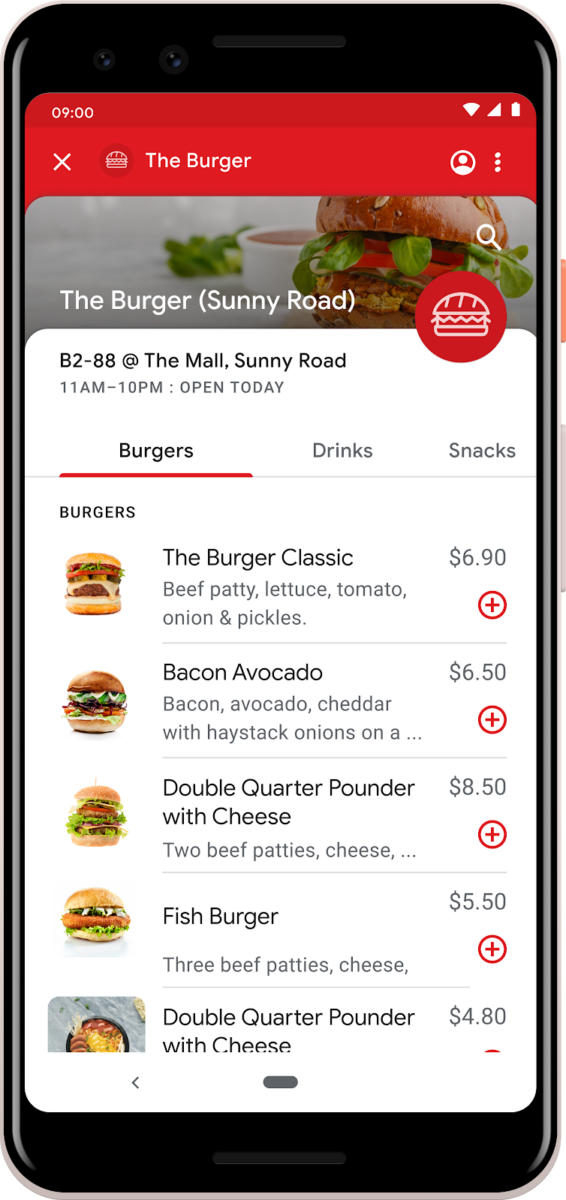
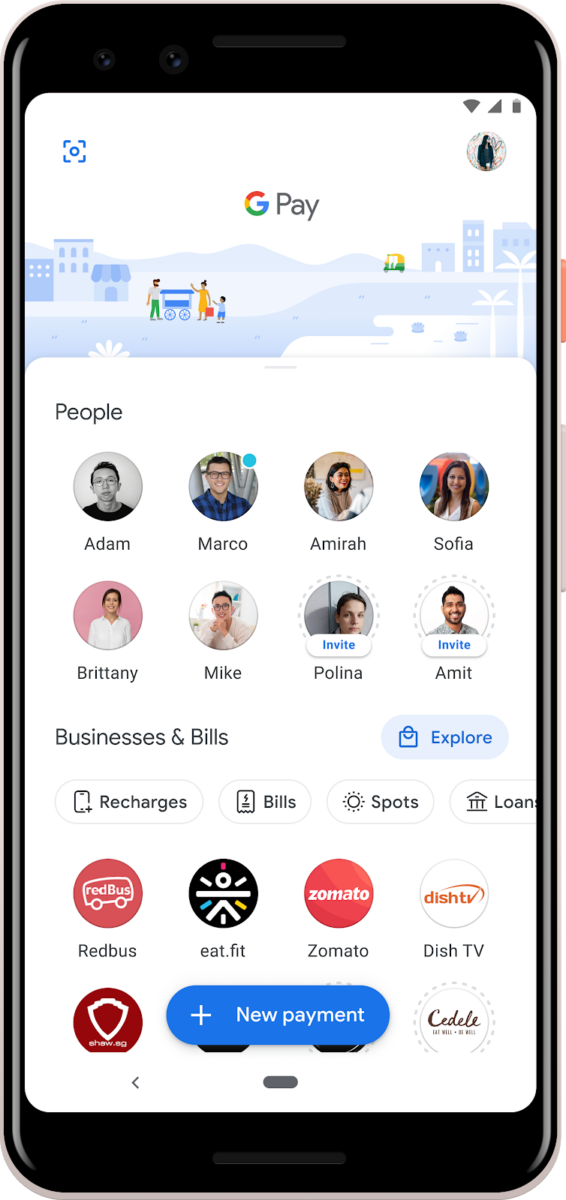
Last week, the Google Pay team announced that the Google Pay for India app (formerly called “Tez”) is getting a major design rewrite with Flutter, Google’s open-source UI development kit. Google currently maintains two versions of the Pay app: one for global users and one for Indians. In the blog post, Google said they were “looking forward to launching Google Pay on Flutter to everyone across the world on iOS and Android.” Some took that to mean that the existing app for global users will be rebuilt with Flutter, while others took it to mean that the old app will be killed off. Tonight, Google Pay version 2.118 rolled out on the Play Store, and it confirms that the latter will happen.

The new Google Pay app built with Flutter.

An APK teardown can often predict features that may arrive in a future update of an application, but it is possible that any of the features we mention here may not make it in a future release. This is because these features are currently unimplemented in the live build and may be pulled at any time by the developers in a future build.

Strings within the APK state that there will be a “deprecation prompt” that will inform users to download the new version of the app.

<string name="deprecation_prompt_get_gp3">Get the new GPay</string>
<string name="deprecation_prompt_install_gp3">Download the new Google Pay</string>
<string name="deprecation_prompt_open_gp3">Open the new GPay</string>
<string name="deprecation_prompt_switch_to_gp3">Use the latest Google Pay</string>

There’s also a new Activity with more details on the app migration. The screen tells users that they’ll “still find [their] favorite features, plus track spending, get helpful insights, earn unique rewards, and more!” If you tap the “Get the new GPay” button at the bottom, the Play Store listing for the former Google Pay for India app will be launched. Currently, the new app is still regionally restricted, so I am unable to directly download it from the Play Store onto my own device.

Google Pay 2.118

Old:

Google Pay: Pay with your phone and send cash (Free, Google Play) →

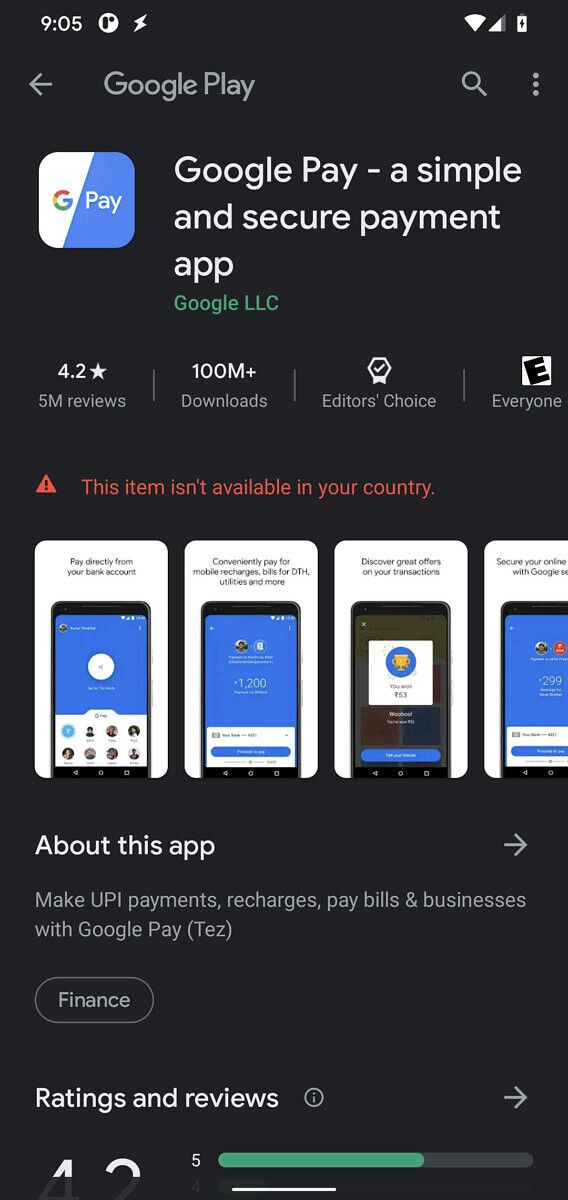
New:

Google Pay - a simple and secure payment app (To be announced, Google Play) →

Once Google starts prompting users to migrate to the new Google Pay app built with Flutter, we’ll let you all know.

Thanks to PNF Software for providing us a license to use JEB Decompiler, a professional-grade reverse engineering tool for Android applications.

The post Google Pay 2.118 confirms the old app will be replaced by the Flutter one appeared first on xda-developers.


from xda-developers https://ift.tt/34bFDXP
via IFTTT

WhatsApp tests redesigned Storage Usage section in latest beta release

Facebook-owned popular messaging app WhatsApp has been testing a host of new features over the last couple of months. Previous beta releases of the app have shed light on some of these features, including multi-device access, search by date, better storage usage tools, expiring messages, a “Mute Always” option for chats, and more. Recently, we talked about another upcoming feature, called “Expiring Media”, which would allow users to send self-destructing images, videos, and GIFs on the platform. While most of these features are yet to make their way to the stable channel, WhatsApp has now started testing a redesigned Storage Usage section in the latest beta release.

As per a recent report from WABetaInfo, WhatsApp has started rolling out v2.20.201.9 of the app on the beta channel. The update introduces a redesigned UI for the Storage Usage section of the app, which builds upon the changes that were spotted in a previous release. As you can see in the attached screenshot, the new UI features a bar at the top to show current storage usage.

WhatsApp beta Storage Usage UI update

Right beneath the bar, there’s a ‘Suggested clean up’ section that shows forwarded files and large files that can be removed to save some space. And underneath that, the section shows a list of all the chats that are occupying the most storage space on your device. This section also has a search button that you can use to quickly search for chats that you wish to delete.

The redesigned Storage Usage section in WhatsApp is a significant improvement over the current design, which just shows a list of all your chats along with the storage space occupied by each chat. As mentioned earlier, the new Storage Usage UI is rolling out with WhatsApp v2.20.201.9 on the beta channel. However, it isn’t available for all users at the moment. This leads us to believe that the redesigned UI isn’t quite ready for primetime and it might be a while before WhatsApp rolls it out to the stable channel.


Source: WABetaInfo

The post WhatsApp tests redesigned Storage Usage section in latest beta release appeared first on xda-developers.


from xda-developers https://ift.tt/3jiqHxd
via IFTTT

Paranoid Android Quartz 5 adds support for the Xiaomi Mi A3 and Mi 6X, adds DC Dimming and other features

Over the last couple of months, the Paranoid Android team has released a couple of Android 10-based builds of the popular custom ROM. With each new build, the team has added new features to the custom ROM and extended support to more devices. With the Quartz 4 release last month, the team added support for nine new devices and introduced features like a system-wide App Locker, internal audio screen record support, and more. Now, the team has released the fifth and final Android 10-based build with support for more devices and a couple of new features.

As per a recent post on the team’s blog, Paranoid Android Quartz 5 is now rolling out for all supported devices, and it includes the following improvements and features:

  • September security patchset
  • App Locker version 1.1: more customization options
  • DC Dimming
  • Lockscreen SmartSpace
  • Ringer Mode Gestures: replicates the feature set offered by the alert slider on OnePlus devices
  • New FOD icon and animation
  • Permissions Hub

Along with the features mentioned above, the Paranoid Android Quartz 5 release also includes a few device-specific changes that can be found in the second post of their respective XDA threads. Furthermore, the latest build brings support for two more devices — Xiaomi Mi 6X and Xiaomi Mi A3. The OTA update for the latest Paranoid Android Quartz build should start rolling out to devices running Quartz 4 in the coming days.

Download Paranoid Android Quartz 5

If you’re interested in trying out Paranoid Android Quartz 5 on your device, you can head over to your device’s XDA forums thread from the links below. Follow the instructions given in the post to install the build on your device.

Note: All the aforementioned builds have Google apps included, so you don’t need to flash a separate ZIP file to get the Google Play Store after installing the ROM. However, if you’re a Galaxy Note 3 user, you will have to flash a separate Gapps package to get Google apps on your device.

As mentioned earlier, Paranoid Android Quartz 5 is the final Android 10-based build of the custom ROM. The team is stopping feature and platform development for the Quartz build to shift focus to the Android 11-based release, which will be called Paranoid Android Ruby. We expect to see the first Paranoid Android Ruby Alpha builds for select devices in the next few months.

It’s also worth noting that the Paranoid Android team had been working to release the Quartz build to a few more devices, including the OnePlus One, Sony Xperia XZ2, XZ2 Dual, Xperia XZ2 Compact, XZ2 Compact Dual, Xperia XZ3, XZ3 Dual, Google Nexus 6P, OnePlus 7, and the OnePlus 7T. But since the team has now halted platform development for the Quartz build, these devices may not receive support anytime soon.

If you’re interested in helping the Paranoid Android team with development, you can reach out to herna@paranoidandroid.co. To stay up-to-date about the custom ROM and new releases, you should consider following the team on Twitter.

The post Paranoid Android Quartz 5 adds support for the Xiaomi Mi A3 and Mi 6X, adds DC Dimming and other features appeared first on xda-developers.


from xda-developers https://ift.tt/2SdCsZY
via IFTTT

mardi 29 septembre 2020

Xiaomi Mi Box 3 finally receives its stable Android Pie update

Xiaomi rolled out the long-overdue Android 9 Pie beta update for the Mi Box 3 earlier this year in August. The update, which measured in at just 620MB, brought Android Pie to the Android TV box and introduced support for the Mi Remote app. Now, Xiaomi is finally releasing a stable version of the update to the Mi Box 3, which brings Android TV 9.0 and support for the Mi Remote app to the stable channel.

Android Pie update Xiaomi Mi Box 3

The Mi Box 3 (codename once) stable Android Pie update measures in at 650MB and it includes the Android security patches for July 2020. With the update, Xiaomi has added a couple of new features to the Android TV box, including a new settings layout, a new power menu that can be accessed by pressing and holding the power button, a less intrusive volume interface, preinstalled Amazon Prime Video app, a Mi Box recommends section in the app drawer, a shortcut for the Google Play Store, and more.

As per a Reddit thread on the matter, the update has started rolling out to Mi Box 3 users worldwide and it should be available on your device. In case you haven’t received the update notification yet, you can manually download the update package from the link below. Do note that the Android Pie build (build number 2604) for the Mi Box 3 is the same as the build for the Mi Box S (codename oneday) that was released earlier this year in April. Therefore, it also includes all of the bug fixes that were previously released for the Mi Box S.

The Mi Box 3 packs in a quad-core Amlogic SoC, Mali 450 GPU, and 2GB of RAM. It supports 4K video playback at 60fps and Dolby Digital Plus audio.

Download Android 9 Pie for the Mi Box 3


Thanks to XDA Recognized Developer yshalsager for the tip and download link!

The post Xiaomi Mi Box 3 finally receives its stable Android Pie update appeared first on xda-developers.


from xda-developers https://ift.tt/2GeyU7n
via IFTTT

Samsung teases a new Good Lock module called Keys Cafe to customize the Samsung Keyboard app

Samsung’s Good Lock suite of customization tools recently received two exciting new modules — Pentastic and Wonderland. In case you missed our coverage of these modules, the new Pentastic module lets you theme the S Pen experience on your Samsung device and the Wonderland module lets you create live wallpapers from any still image of your choice. Now, Samsung is teasing yet another Good Lock module, called Keys Cafe, that will let you personalize the Samsung Keyboard app.

As per a recent press release from the company, the upcoming Keys Cafe module will let you customize the Samsung Keyboard app as per your preference. It will include support for keyboard height and width adjustment, key layout repositioning options, a wide range of themes to customize the look of the keyboard app, and dynamic effects that will bring your keyboard to life.

Additionally, the Keys Cafe module will come with a gamification feature that aims to help you minimize typos by turning typing into a game. The feature will give you a score and ranking based on your performance, which is expected to help you improve your typing accuracy over time. The Keys Cafe module will be available on Samsung devices running One UI 2.1 and above starting next month. In order to use the module, you’ll also need to update the Samsung Keyboard app to version 5.1.05.

Along with the upcoming Key Cafe module, Samsung has announced an update for the Home Up module. The update will introduce a new Share Manager feature that will let you hide specific share commands from the sharing window, manage your Direct Share contacts, and select the apps you want to see in the sharing window. The new Share Manager feature will soon be available on devices running One UI 2.5 and above.

Furthermore, Samsung is pushing an update for the MultiStar module with a new I ♡ Galaxy Tablet feature. The feature includes a Wireless Keyboard Share option that lets you connect your tablet’s physical keyboard with your Galaxy smartphone for a better typing experience. It also lets you quickly switch between the two devices at the tap of a button. This update has already started rolling out to Galaxy tablet users and it’s supported on tablets running One UI 2.5.


Source: Samsung Newsroom

The post Samsung teases a new Good Lock module called Keys Cafe to customize the Samsung Keyboard app appeared first on xda-developers.


from xda-developers https://ift.tt/3l0f0vS
via IFTTT