LightBlog

mardi 29 septembre 2020

Samsung teases a new Good Lock module called Keys Cafe to customize the Samsung Keyboard app

Samsung’s Good Lock suite of customization tools recently received two exciting new modules — Pentastic and Wonderland. In case you missed our coverage of these modules, the new Pentastic module lets you theme the S Pen experience on your Samsung device and the Wonderland module lets you create live wallpapers from any still image of your choice. Now, Samsung is teasing yet another Good Lock module, called Keys Cafe, that will let you personalize the Samsung Keyboard app.

As per a recent press release from the company, the upcoming Keys Cafe module will let you customize the Samsung Keyboard app as per your preference. It will include support for keyboard height and width adjustment, key layout repositioning options, a wide range of themes to customize the look of the keyboard app, and dynamic effects that will bring your keyboard to life.

Additionally, the Keys Cafe module will come with a gamification feature that aims to help you minimize typos by turning typing into a game. The feature will give you a score and ranking based on your performance, which is expected to help you improve your typing accuracy over time. The Keys Cafe module will be available on Samsung devices running One UI 2.1 and above starting next month. In order to use the module, you’ll also need to update the Samsung Keyboard app to version 5.1.05.

Along with the upcoming Key Cafe module, Samsung has announced an update for the Home Up module. The update will introduce a new Share Manager feature that will let you hide specific share commands from the sharing window, manage your Direct Share contacts, and select the apps you want to see in the sharing window. The new Share Manager feature will soon be available on devices running One UI 2.5 and above.

Furthermore, Samsung is pushing an update for the MultiStar module with a new I ♡ Galaxy Tablet feature. The feature includes a Wireless Keyboard Share option that lets you connect your tablet’s physical keyboard with your Galaxy smartphone for a better typing experience. It also lets you quickly switch between the two devices at the tap of a button. This update has already started rolling out to Galaxy tablet users and it’s supported on tablets running One UI 2.5.


Source: Samsung Newsroom

The post Samsung teases a new Good Lock module called Keys Cafe to customize the Samsung Keyboard app appeared first on xda-developers.


from xda-developers https://ift.tt/3l0f0vS
via IFTTT

Vivo beats Google to launching the first phone with Android 11

In a little over 12 hours from now, Google will announce the Pixel 4a 5G and Pixel 5 at its Launch Night In event. Thanks to numerous leaks, we pretty much know everything there is to know about the two phones, including the fact that they’ll both launch with the latest version of Android, Android 11, out of the box. An update to Android 11 was released for existing Pixel devices on September 8th, and we’ve seen numerous OEMs release beta updates for their own devices. But so far, no one has launched a new smartphone with the latest version out of the box. We all thought that Google would be the first one to do so, but Chinese smartphone brand Vivo has beaten them to the punch with the launch of the new Vivo V20.

In a press release, Vivo says its new V20 series “will run on the recently-launched Android 11 operating system,” which sure sounds like the 3 devices will run on the latest OS version. However, the press release also mentions that the company “has a plan to equip V20 series with Android 11 in succession” depending “on market conditions.” That’s rather vague, and left us to wonder if the Vivo V20 SE, V20, and V20 Pro really will run Android 11. It wouldn’t be the first time we’ve seen companies mention the latest OS version as a marketing tactic—HMD Global says its new Nokia 2.4 and Nokia 3.4 are “Android 11-ready,” which just means they’ll receive the actual Android 11 update whenever the company is ready to roll it out. Interestingly, the product pages for the Vivo V20 SE and V20 Pro state the two devices are running Funtouch OS 11 based on Android 10, while the product page for the Vivo V20 says it’s running Funtouch OS 11 based on Android 11.

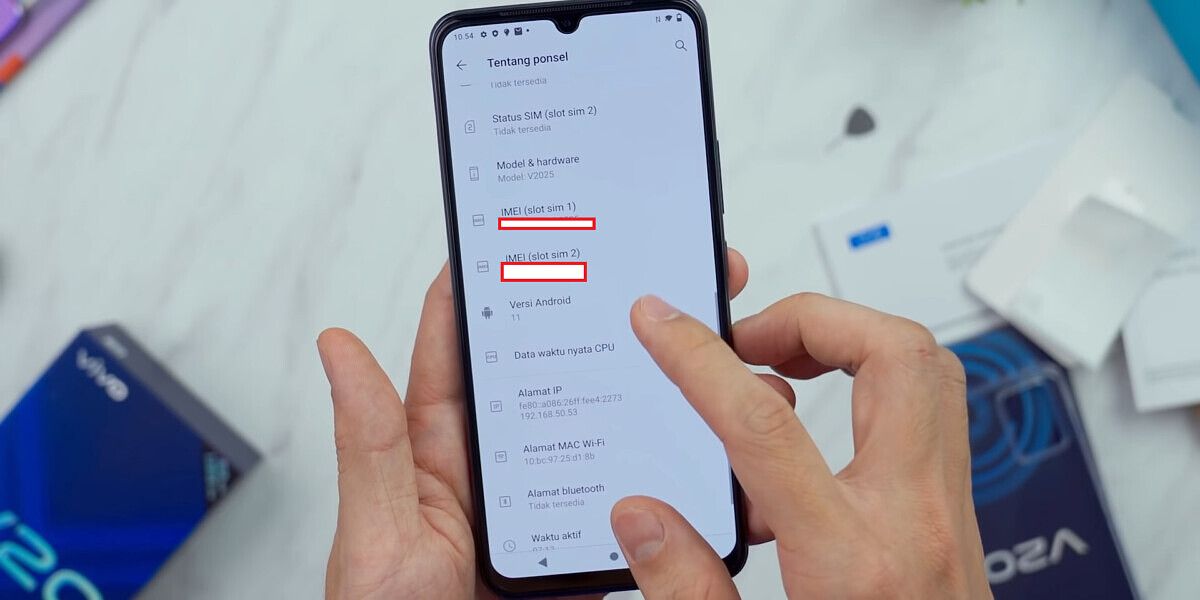
Thankfully, it’s easy for us to confirm that the regular Vivo V20 is, in fact, running the latest Android version. The phone has already reached the hands of Indonesian YouTubers like GadgetIn, who published an unboxing of the new phone. In the video, he goes through the settings menu and shows that the device is running Android Version 11 and has the new Easter egg.

Vivo V20 running Funtouch OS 11 based on Android 11. Source: GadgetIn.

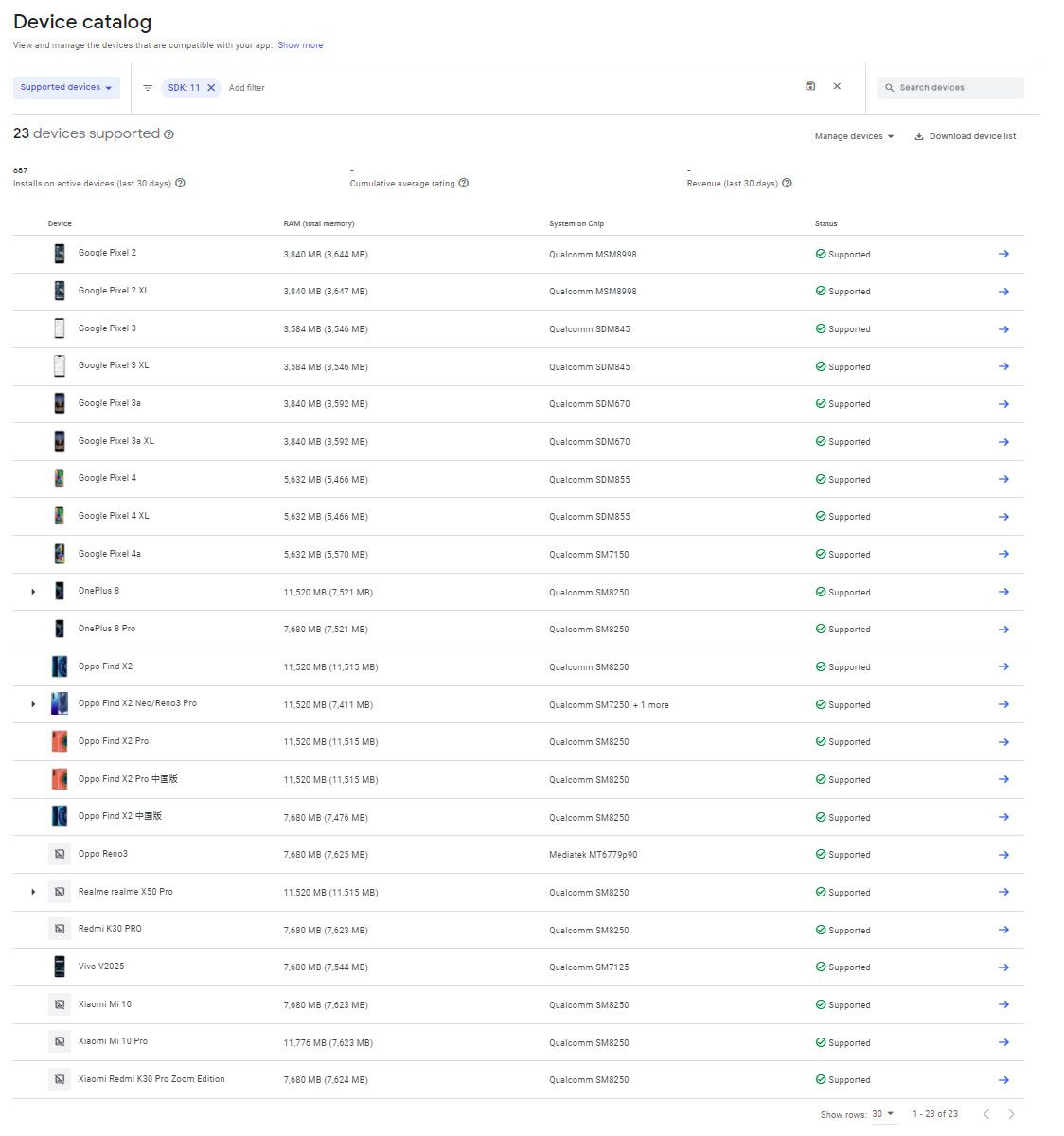
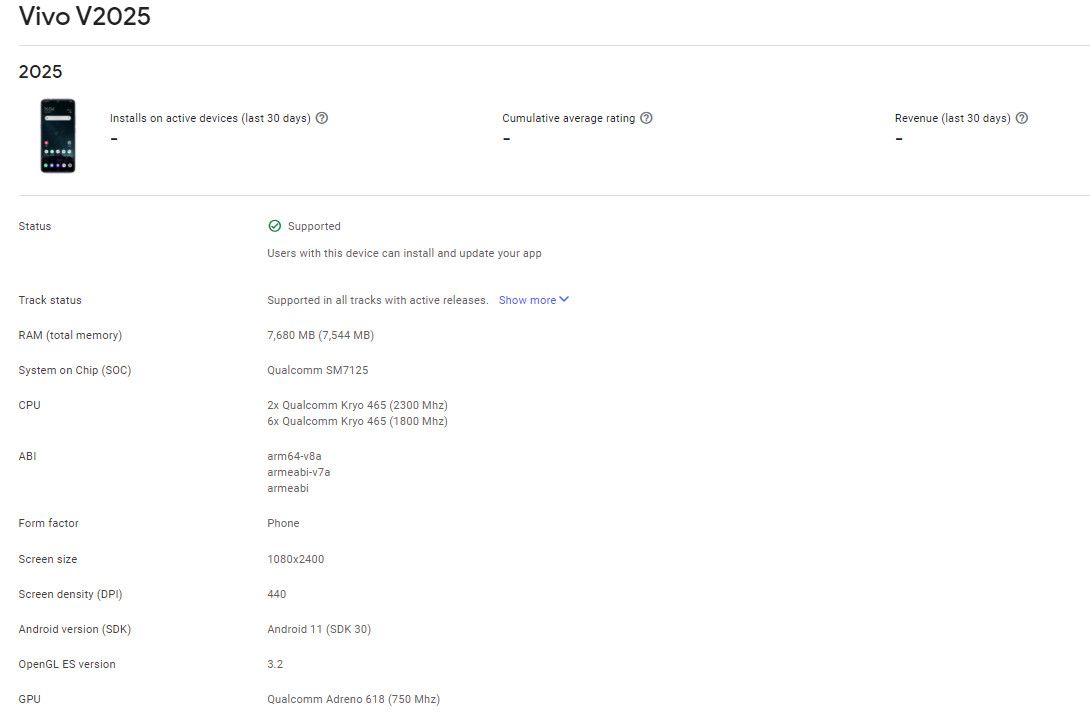
His video also confirms that the device’s model name is “V2025.” I cross-referenced that with the Google Play Console’s Device Catalog and confirmed that the device’s SDK level is indeed listed as “30” for Android 11. In fact, the Vivo V20 is the only device on the catalog to have its SDK version listed as “30” and nothing else, confirming it’s the first phone to launch with the latest Android version. All the other phones on the catalog that support SDK level 30 either upgraded to Android 11 (like the current crop of Pixel phones and the ADT-3) or are currently in beta (like the OnePlus, OPPO, Realme, and Xiaomi phones that are listed).

As for why this matters, well, there are two reasons. First, the fact that an OEM managed to beat Google to launching a phone with Android 11 is impressive considering how slow most OEMs usually are at releasing major OS updates. Second, the “shipping API level” of a phone is actually quite important to note, because it factors into how many OS updates the manufacturer is expected to deliver. When most OEMs promise “2 years” of OS upgrades, they really mean “2 letter upgrades” or “2 generations of updates.”Thus, a phone launching with Android 10 can expect to get an update to Android 11 and Android 12, while a phone launching with Android 11 can expect to get an update to Android 12 and Android 13. We’re not sure how long Vivo plans on supporting the new Vivo V20, but it’s definitely promising that the phone has launched with the latest OS version.

The post Vivo beats Google to launching the first phone with Android 11 appeared first on xda-developers.


from xda-developers https://ift.tt/2GaPk0G
via IFTTT

Today’s Top Tech Deals: $30 Off Galaxy Buds Live, Over 80% Off a Solar-Powered Battery Pack, and More!

I see some crazy products when looking for deals, but I have to say, this Sero Series TV is one of the strangest, yet coolest I’ve seen. It’s essentially a gigantic smartphone in many ways that you can flip into portrait mode for mobile content and flip back into landscape mode for media viewing. It’s exciting, though I don’t know if it’s ever something I’d particularly want in my home. It’s on sale and includes a $600 Dell gift card, so this may be the TV for you.

Enough about the TV, though. Today’s top tech deals include a huge discount on a solar-powered backup battery, $20 off the Samsung Galaxy Buds Live, and more!

If you’ve been looking to get the special edition Animal Crossing Nintendo Switch, they’re currently in stock at Best Buy. As usual with Switches, there’s no guarantee they’ll be in stock for long, and there’s always a chance they’ll come in and out of stock throughout the day. Keep checking and grab one if you see it available!

Google Pixel 4 XL, 25% Off

If you’re looking to jump onto the Google smartphone train, then the Google Pixel 4 XL may be a good choice for you. At Amazon, you can save 25% off the MSRP, bringing the total down to $750. The sale price is also available as part of a 5-month payment plan, open to anyone, not just for Amazon Prime Rewards cardholders. This is an unlocked Pixel 4 XL and should work with all US carriers.

Samsung Galaxy Buds Live for $30 Off

The Galaxy Buds Live came out less than two months ago, but you can already save some money on the beans. Over at eBay, you can get a pair of Buds Live for $140, $30 off the MSRP. Our recent review for the Galaxy Buds Live praises the unique, bean-like design and having active noise cancellation (though not perfect). If you’re in the market for new buds, perhaps the Galaxy Buds Live will be your choice?

    Samsung Galaxy Buds Live
    $30 off Samsung's recent earbud release? You can't get much better than this! Choose between five colors and get to enjoying the bean-shaped earbud life. The Buds Live also have active noise cancellation!

Samsung Galaxy Tab S6 Lite for $280

Want a tablet, but don’t really need the bleeding edge? If you just need a tablet with a pen that gets basic tasks done, then you can pick up the Samsung Galaxy Tab S6 Lite for $280, $70 off MSRP. The tablet comes with the ever-helpful S Pen, lasts up to 13 hours on a single charge, and has memory that can easily be expanded with a MicroSD card. You’ll be satisfied without breaking the bank!

    Samsung Galaxy Tab S6 Lite
    Get yourself a cheap but high-end tablet today with the Galaxy Tab S6 Lite! This tablet is great for basic productivity tasks and watching media, and the included S Pen makes it a great budget choice for note-takers and artists.

Aduro Solar 6000mAh Dual Backup Battery for $15

Solar-powered battery packs are a great emergency item to have around. If your house is out of power, just let the sun charge your phone! At Woot!, you can save a whopping 81% on an Aduro solar backup battery, bringing the total down to $15. the 6000mAh should charge your phone once or twice depending on its battery capacity, which is perfect for when you might be out or the power goes out and you need your device for an emergency. If you have Amazon Prime, you’ll also get free shipping.

    Aduro PowerUp Solar 6000mAh Backup Battery
    Be prepared for an emergency with a solar-powered battery pack. Save big on top of it by grabbing an Aduro solar-powered backup battery for just $15. With multiple colors and Prime Shipping available, why not grab one?

TP-Link N300 Wi-Fi Extender for $18

If you live in a larger apartment or home, you know about the ‘dead zone’, that frustrating part of the home where the Wi-Fi isn’t quite as good. It’s lame, but you can help resolve the dead-zone issues with a Wi-Fi extender! TP-Link’s N300 extender, currently $18 at Amazon, takes your router’s Wi-Fi connection and just… makes it go farther! Putting it near (but not in) the dead zone should help resolve your connection woes.

More Tech Deals

Looking for even more tech deals? We have them for you below!

The post Today’s Top Tech Deals: $30 Off Galaxy Buds Live, Over 80% Off a Solar-Powered Battery Pack, and More! appeared first on xda-developers.


from xda-developers https://ift.tt/30i3YtH
via IFTTT

[Update: Approval Expected] EU to launch investigation into Google’s Fitbit acquisition

Update 1 (09/29/2020 @ 12:35 PM ET): Google’s deal to acquire Fitbit is expected to gain approval from the EU. Scroll to the bottom for more information. The article as published on August 4, 2020, is preserved below.

Last year, Google announced its intent to acquire Fitbit, an American technology company that focuses on wearable technology, saying the move was about “devices, not data.” Even with Google making these assurances, however, the European Commission this week revealed plans to launch an investigation into the acquisition, citing concerns over the search giant’s access to health data and its position in online advertising.

The investigation is expected to last 90 days, which means the Google-Fitbit deal can’t close until the end of this year at the earliest. Google said it hopes to build “compelling devices” once the deal is done, so the investigation will certainly put a damper on the search giant’s future plans — at least for now.

In a press release, the European Commission said data that’s collected via wrist-worn devices could provide Google with a major advantage in online advertising markets. “By increasing the data advantage of Google in the personalization of the ads it serves via its search engine and displays on other internet pages, it would be more difficult for rivals to match Google’s online advertising services,” the commission said.

Google, meanwhile, claims the acquisition is about providing customers with more choice. In a blog post on Tuesday, Google’s Rick Osterloh said that Google’s AI and Fitbit’s hardware expertise will “increase competition in the sector” and result in better wearables that are more affordable. Osterloh went on to say that Fitbit users have the choice to review, move, or delete their data, which will be siloed away from its ad tracking business. “We’ve been clear from the beginning that we will not use Fitbit health and wellness data for Google ads,” Osterloh said. “We recently offered to make a legally binding commitment to the European Commission regarding our use of Fitbit data.”

Despite Google’s commitments, the European Commission still believes Google will use data as a result of the transaction, giving the search giant an unfair advantage for advertising purposes. Google doesn’t currently make its own wearable devices but instead develops the Android-based Wear OS platform which is used in smartwatches made by the Fossil Group, Xiaomi, OPPO, Mobvoi, and other companies.


Update 1: Approval of Google, Fitbit deal expected

According to sources speaking to Reuters, Google’s $2.1 billion purchase of Fitbit is on track to receive approval from the EU. In a statement, Google told the publication that it had offered to restrict the use of health data for ads and would strictly monitor the use of that data. “We’re also formalizing our longstanding commitment to supporting other wearable manufacturers on Android and to continue to allow Fitbit users to connect to third party services via APIs (application programming interfaces) if they want to,” a Google spokesperson told Reuters. These concessions, which were part of a proposal Google submitted to the EU in July, are apparently enough for the European Commission to consider approving the deal. According to Reuters, Google’s initial proposal was to just limit the use of fitness tracking data for advertising purposes, but that was rejected as being insufficient; Google’s new pledge to support interoperability by continuing to allow Fitbit users to connect their trackers to third-party services seems to have sweetened the deal.

The EU is scheduled to give its decision on the deal by December 23rd, 2020, though the Commission will now reach out to rivals and other customers in this space to seek additional feedback before deciding on whether or not to accept the deal. Reuters points out that healthcare providers and privacy advocates are concerned about what kind of data Google is seeking from this deal and where the company will acquire that data, so Google may still need to make more concessions before the deal is finalized.

The post [Update: Approval Expected] EU to launch investigation into Google’s Fitbit acquisition appeared first on xda-developers.


from xda-developers https://ift.tt/31g9bCd
via IFTTT

Xiaomi Android 11 Tracker: Here are all the official MIUI beta and stable builds to download and install

Following the arrival of the first public beta of Android 11 back in June, Xiaomi published similar AOSP-style beta builds for the Mi 10/10 Pro and the Redmi K30 Pro (e.g. the Chinese variant of the POCO F2 Pro) later that month. Shortly thereafter, the Chinese OEM started rolling out MIUI 12-based closed beta builds for these phones, however, the underlying layer of Android was still based on the beta codebase. Now that Android 11 hits the stable milestone, Xiaomi has already prepared stable MIUI 12 builds on top of the latest iteration of Android.

The first batch of global devices to receive the MIUI 12-infused stable Android 11 update includes the Xiaomi Mi 10 and Mi 10 Pro. Many more Mi, Redmi, and POCO branded smartphones are expected to get the update in the coming days. This article will serve as the central repository of download links for all Xiaomi devices that have received their official Android 11 updates, including the ones powered by Android One instead of MIUI.

It is worth mentioning that the MIUI versioning scheme doesn’t have a one-to-one correspondence with the version of Android. While Xiaomi is expected to unveil a new version of MIUI — tentatively MIUI 13 — with new features in the near future, the company will continue to produce MIUI 12-based Android 11 builds for compatible devices during the transition phase.

The compatible devices will initially get the taste of Android 11 through the MIUI beta channel (which has now been rebased on top of the stable Android 11 codebase), and then through the stable channel builds. Features on Xiaomi devices are often decided more by their MIUI version and less by their Android version. So you can take a look at our other trackers for MIUI 12 builds.

Download: MIUI 12 stable update rolling out to several Xiaomi, Redmi, and POCO devices

Download the MIUI 12 Closed Beta for Xiaomi and Redmi devices


Xiaomi Android 11 Update List: Which phones have received the stable update?

This article covers Xiaomi (Mi), Redmi, and POCO devices that have received a stable Android 11 update—be it a “stable beta” or actual stable build—in any region. Cross-flashing different regional builds is technically possible but only do so if you’re familiar with the process.

Here are the devices that currently have an Android 11 build based on the stable Android branch available. Note that the devices are sorted alphabetically for their codename.

  1. Xiaomi Mi 10 Pro (cmi) — Added on 09/09/2020
  2. Redmi K30 Pro / POCO F2 Pro (lmi) — Added on 09/09/2020
  3. Xiaomi Mi 10 (umi) — Added on 09/09/2020

Generic flashing instructions are available at the bottom of this article. However, we advise users to refer to the device forums for specific flashing instructions for their device, in case there are any variations or special instructions that need to be followed. Notably, the concept of a downgrade ROM isn’t applicable here. First, check the Anti-Rollback Protection status of your model and then flash the appropriate stable Android 10-based Fastboot firmware if you need to revert back.


MIUI 12 based on stable Android 11: Download Links

You can find download links of MIUI 12 based stable beta and stable releases below. These builds are first sorted with device codenames, and then according to their regions and release. Recovery ROMs and Fastboot ROMs are both included, wherever present.

1. Xiaomi Mi 10 Pro (cmi)

Sr. No. Channel, Build Number, and Region Recovery ROM Fastboot ROM Added On/Status Last Updated
MIUI 12 Stable Beta (China)
1.1. V12.1.2.0.RJACNXM Download Link September 9, 2020
1.2. V12.1.3.0.RJACNXM Download Link September 29, 2020
MIUI 12 Stable Beta (Global)
2.1. V12.1.2.0.RJAMIXM Download Link September 10, 2020

2. Redmi K30 Pro / POCO F2 Pro (lmi)

Sr. No. Channel, Build Number, and Region Recovery ROM Fastboot ROM Added On/Status Last Updated
MIUI 12 Stable Beta (China)
1.1. V12.1.2.0.RJKCNXM Download Link September 9, 2020
1.2. V12.1.3.0.RJKCNXM Download Link September 29, 2020

3. Xiaomi Mi 10 (umi)

Sr. No. Channel, Build Number, and Region Recovery ROM Fastboot ROM Added On/Status Last Updated
MIUI 12 Stable Beta (China)
1.1. V12.1.3.0.RJBCNXM Download Link September 9, 2020
MIUI 12 Stable Beta (Global)
2.1. V12.1.2.0.RJBMIXM September 9, 2020


Flashing Instructions for Android 11-based MIUI 12

Note that these are generic flashing instructions that should generally be applicable across Xiaomi, Redmi, and POCO devices. However, there is a possibility that there is a variation that is unique to your device, so we strongly advise visiting your device forums for device-specific instructions.

Recovery ROM Installation for Android 11-MIUI 12

Recovery ROMs come with a .zip file extension and can be installed either through the Local Update method from within MIUI, or through the recovery environment. Newer versions of the stock MIUI recovery don’t offer any option for sideloading, but you can use a custom recovery like TWRP for installing these ROMs, though do note that device-specific instructions may differ in that case.

  1. Local Update method:
    1. Transfer the download .zip file to your phone, and ensure you place the file in the “downloaded_rom” folder in the internal storage of your device. If no such folder exists, create one in your internal storage base directory.
    2. Within your phone, navigate to Settings > About Phone > System Update, and then press the three-dot icon in the top-right corner, and select “Choose Update Package”.
    3. If the “Choose Update Package” option is missing, tap on the MIUI logo 10 times to activate the option.
    4. Choose the downloaded .zip file.
    5. Wait for the update to install.
  2. Recovery method:
    1. Rename the downloaded .zip file to update.zip and transfer it to the base directory of your phone’s internal storage.
    2. Reboot your phone into recovery mode by powering it off and then pressing both the Power and the Volume Up buttons together.
    3. Scroll to the “Install update.zip” option using the volume keys, and select the option using the power button.
    4. Wait for the update to install.
    5. Choose the “Reboot” option if your phone does not reboot by itself after installation is completed.

Fastboot ROM Installation for Android 11-MIUI 12

Fastboot ROMs come with a .tgz file extension and require a Windows computer for the installation, as well as a phone with an unlocked bootloader. However, despite being comparatively more complicated to install than Recovery ROMs, Fastboot ROMs are sometimes the only way to boot into a working system. For instructions on unlocking the bootloader of your phone, check your device’s subforums on XDA.

  1. Download MiFlash Tool on your Windows computer. The latest version can be found in Step 1 of this link. Once downloaded, extract the tool and install it. It is also advisable to have ADB and Fastboot installed, just in case you need it.
  2. Reboot your phone into Download mode by powering it off and then pressing both the Power and Volume Down buttons together.
  3. Connect your phone to the computer using the appropriate USB cable.
  4. Download the Fastboot ROM .tgz file and extract it. Remember the extract location, as you will need to paste the address into MiFlash Tool.
  5. Run MiFlash Tool on your Windows Computer and in the address bar within the tool, paste the extract location from Step 4.
  6. Click “Refresh” within MiFlash and the app should automatically recognize your device.
  7. Click “Run” within MiFlash to flash the ROM file to the device.
  8. The progress bar within MiFlash will turn green, which indicates that the ROM was successfully installed. Your device should boot automatically to the new version.

Thanks to XDA Recognized Developer yshalsager for providing the download links!

The post Xiaomi Android 11 Tracker: Here are all the official MIUI beta and stable builds to download and install appeared first on xda-developers.


from xda-developers https://ift.tt/2FjVElE
via IFTTT

Motorola Razr 5G launch date in the US unveiled for October 2

After taking the wraps off its new Razr smartphone earlier this month, Motorola on Tuesday announced when the foldable will be available — and it’ll come at a pretty nice discount.

Motorola revealed the new foldable Razr 5G will be available in the U.S. on October 2 for $1,199, which is a $200 discount on the regular retail price. The new Razr will be available at AT&T and T-Mobile, and unlocked through Motorola, Amazon, Best Buy, and B&H Photo in Polished Graphite, Blush Gold, and Liquid Mercury (AT&T exclusive) colors.

Here are some of the promotions being offered during the new Motorola Razr 5G’s launch:

  • At AT&T, for a limited time, both new and existing customers who trade in an eligible device and purchase the Motorola razr on a qualifying installment plan with an eligible AT&T unlimited wireless plan could qualify for one of the following offers:
    • New customers get up to $700 off (50% off) the device by bringing their number to AT&T.
    • Existing customers get up to $400 off by adding a line or up to $300 off by upgrading their device.*
    • HBO Max is included on the AT&T Unlimited Elite plan
  • At T-Mobile, for a limited time, has two offers for new and existing customers:
    • Get the Motorola razr for half off with 24 monthly bill credits when you activate a new line and trade-in an eligible device.
    • Get $400 off the Motorola razr with 24 monthly bill credits and eligible device trade in.
  • At Motorola.com, Amazon.com, Best Buy and B&H Photo, for a limited time, customers can purchase the new razr for $200 off with no contract needed!

Announced at the beginning of September, the new Motorola Razr 5G is a step above the version introduced last year. Not only does the new device feature support for 5G, but it introduces a more durable design, a beefier processor, a larger battery, and an improved rear camera.

Motorola Razr 5G Forums

If you haven’t seen the new Motorola Razr 5G, it plays heavily on the old clamshell design that made Razr one of the most successful brands in mobile history. You can read more about the new Motorola Razr in our announcement post.

Motorola Razr 5G: Specifications

Specification Motorola Razr 5G
Dimensions and Weight
  • Unfolded: 72.6 x 169.2 x 7.9 mm
  • Folded: 72.6 x 91.7 x 16 mm
  • Gorilla Glass protection on the back with a matte finish
  • Water repellant design
  • 192g
Display
  • Main: 6.2-inch pOLED (2142×876), 21:9
  • External: 2.7-inch gOLED (800×600), 4:3
SoC
  • Qualcomm Snapdragon 765G:
    • 1x Kryo 475 (ARM Cortex-A76-based) Prime core @ 2.4GHz
    • 1x Kryo 475 (ARM Cortex-A76-based) Performance core @ 2.2GHz
    • 6x (ARM Cortex-A55-based) Efficiency cores @ 1.8GHz
    • 7nm EUV process
  • Adreno 620 GPU
RAM and Storage
  • 8GB RAM
  • 256GB flash storage
Battery & Charging
  • 2,800 mAh battery
  • 15W fast charger (inside the box)
Rear Camera
  • Rear: 48MP Quad Pixel f/1.7, 1.6μm
    • OIS
    • Laser autofocus (ToF)
    • 4K@30fps video recording
  • Front: 20MP Quad Pixel, f/2.2, 1.6μm
Connectivity
  • 5G NR Sub-6GHz, 4G LTE
    • (China/Japan/EMEA/ANZ SKU):
      • 5G: sub-6GHz band n1/n3/n5/n7/n28/n41/n41 HPUE/n77/n78/n78 HPUE/n79/n79
      • 4G: LTE band 1/2/3/4/5/7/8/12/13/17/18/19/20/26/28/34/38/39/40/41/42/46/66/71
    • (NA/LATAM/CAN SKU):
      • 5G: sub-6GHz band n2/n5/n25/n41/n41 HPUE/n66/n71/n78
      • 4G: LTE band 1/2/3/4/5/7/8/12/13/14/17/18/19/20/25/26/28/29/30/38/39/40/41/41 HPUE/46/48/66/
  • Bluetooth 5.0
  • NFC
  • Type-C port (USB 3.1)
  • WiFi 802.11.b/g/n/ac (2.4GHz + 5GHz)
  • GPS, A-GPS, GLONASS, Galileo
Other Features
  • Single bottom-firing speaker
  • 4 microphones
  • Dual SIM (1 Nano SIM + 1 eSIM)
Software
  • Android 10 with My UX
  • 2 guaranteed major OS upgrades
  • Bi-monthly security updates for 2 years

The post Motorola Razr 5G launch date in the US unveiled for October 2 appeared first on xda-developers.


from xda-developers https://ift.tt/33ctSB6
via IFTTT

OnePlus releases kernel sources of the Android 11 update for the OnePlus 8 series

OnePlus launched the OnePlus 8 and the OnePlus 8 Pro in April 2020 with Android 10, whereas the corresponding kernel source for the device duo made its way to the company’s GitHub repo about a month later. The OnePlus 8 series received its stable Android 11 update in the form of OxygenOS Open Beta earlier this month, bringing the phones up to speed on the latest version of Android. While we have no information on when exactly the stable version of OxygenOS 11 is arriving, OnePlus has already uploaded kernel sources for the Android 11 update for the OnePlus 8 and 8 Pro.

OnePlus 8 XDA Forums || OnePlus 8 Pro XDA Forums

If you’re a developer planning to cook an Android 11 based custom ROM for these devices or if you’re a power user looking to tinker with low-level kernel parameters, you can now access the updated kernel sources from the link below. The SM8250_R_11.0 branch on the android_kernel_oneplus_sm8250 repo contains the kernel source code for the upcoming stable OxygenOS 11/Android 11 updates for these devices. Note that the audio kernel components are hosted under a separate repo, which can be found here.

OnePlus 8 and OnePlus 8 Pro Android 11 Kernel Sources

Another interesting fact is that the upcoming OnePlus 8T is expected to run OxygenOS 11 on top of Android 11 out of the box. Given the shared nature of the OxygenOS codebase, the aforementioned kernel source might contain a handful of references to the 8T.

Buy from Amazon.in: OnePlus 8 || 8 Pro

The company has been silent on when OxygenOS 11 is going to arrive for the OnePlus 8 lineup via the stable channel. Since the Android 11 kernel sources are now live, we presume that the updates are on the horizon. If you cannot wait to try out Android 11 on your device, know that you can always flash the latest Open Beta release on both the OnePlus 8 and 8 Pro. Experienced users can also try out custom AOSP 11.0 GSIs, albeit they are not suitable for regular usage just yet.

The post OnePlus releases kernel sources of the Android 11 update for the OnePlus 8 series appeared first on xda-developers.


from xda-developers https://ift.tt/2FZLJTb
via IFTTT