LightBlog

mardi 1 septembre 2020

[Updated] Google Home app adds a dark theme, expanded Android 11 controls, unified camera feed, and more

Update 1 (09/01/2020 @ 05:44 PM ET): A server-side update has enabled Nest x Yale lock support in the Google Home app for many users. Furthermore, the current status for smart lights and switches will show up in the main screen. Scroll to the bottom for more information. The article as published on , 2020, is preserved below.

Google Assistant users were treated to a slew of new features in the latest version of the Google Home app for Android. Version 2.27 of the app brings expanded support for Android 11’s smart home power menu controls, the addition of a dark theme, a unified camera feed, and teases the ability to unlock Google Nest smart locks. Here’s a summary of what’s new.

Unified Nest camera page

One of the most helpful new features in Google Home version 2.27 is a new unified page for all your camera feeds (via 9to5Google). Going forward, users can access a page that will show every camera feed on their network. The view is similar to what you’d get in the Nest app. Currently, it only seems to show feeds from Nest cameras.

Screenshots credit: Abner Li/9to5Google

To access it, simply tap on the “Cameras” button right under the name of your home.

Unlock Nest smart locks

Google Home has gained the ability to unlock Nest x Yale locks which means you can now lock and unlock Nest x Yale locks from the Home app rather than the Nest app. You can’t lock/unlock by voice yet, so you’ll need to tap and hold to unlock. In device settings, you can change the lock tone and enable one touch locking, but you can’t customize any privacy settings yet. Privacy settings will have to be changed in the Nest app for now until Google brings these settings over to the Home app.

Google actually teased this feature in a promo featuring Fred Armisen, who unlocks the Nest x Yale lock with his Android device. The feature went live for the iOS app last week (via 9to5Google) and is now rolling out to users on Android (via AndroidPolice).

Nest x Yale lock support in the Google Home app. Screenshots credit: AndroidPolice

Dark theme

Additionally, Google has added a dark theme to Google Home which syncs with Android’s system-wide dark mode toggle, making the app a little easier on the eyes. Google has brought dark mode to its various apps over the past year, and it’s nice to see the same treatment brought to Google Home. AndroidPolice notes that the dark theme has been applied to basically every part of the app, including the settings, the media controller, and more.
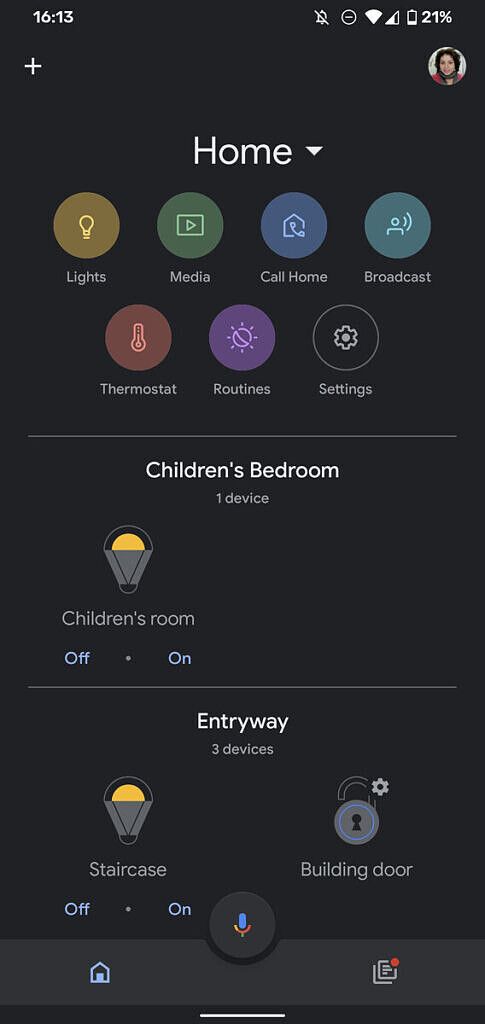
Screenshots credit: Rita El Khoury/AndroidPolice

There’s no toggle to change the theme in the app’s settings, though.

Expanded Android 11 Device Controls support

As spotted by AndroidPolice, the same Google Home 2.27 update also expands upon the types of devices you can add to Android 11’s power menu. You can now add Chromecasts, speakers with Google Assistant or Chromecast built-in, and smart displays to the power menu.

Google Home 2.27 now lets you add Google Assistant smart speakers (like ones from JBL), soundbars, and Google Home devices. Screenshots credits: Rita El Khoury/AndroidPolice

View Smart Light/Switch Status in the Main Screen

As spotted by /u/cassiopeia519 on the /r/GoogleHome subreddit (via AndroidPolice), you can now see the current status of smart lights and switches in the main screen of the Google Home app. Lights will have a yellow outline when they’re on while switches will have a green outline. In addition, you won’t see both on and off buttons anymore, as instead only the button that toggles the state will be shown (so, for example, only “turn off” will be shown when the light/switch is on.)

Credits: /u/cassiopeia519


That’s quite a lot of new features squeezed into one update. Not only is Google Home more visually pleasing, but it’s now more useful for anyone with a Google Nest product. Google Home v2.27 is rolling out now on the Google Play Store, but as always, you can sideload the latest release from APKMirror to skip the wait.

Google Home (Free, Google Play) →

The post [Updated] Google Home app adds a dark theme, expanded Android 11 controls, unified camera feed, and more appeared first on xda-developers.


from xda-developers https://ift.tt/3jaNtH5
via IFTTT

Google, Apple introduce Exposure Notifications Express to boost participation in COVID-19 contact tracing

Exposure Notifications System is a framework developed jointly by Google and Apple that consists of an iOS and Android API and a Bluetooth Low Energy spec with the goal being to empower public health agencies to develop power-efficient and secure COVID-19 contact tracing apps. Introduced a few months back, ENS is designed to allow you to know if you’ve been exposed to someone who has self-reported a positive COVID-19 diagnosis. The Google/Apple framework is now used by several countries and recently received a few privacy-focused improvements. But it’s still very limited in that public health agencies need to actually develop an app using the API in order for its citizens to participate in contact tracing. This barrier to entry has impeded the efforts of the medical community in implementing contact tracing at a scale necessary to contain the spread of COVID-19. To tackle this problem, Google and Apple are introducing a new framework called Exposure Notifications Express (via Axios).

Exposure Notifications Express lets public health authorities set up COVID-19 contact tracing systems without having to develop a full-blown app of their own. Health agencies submit a configuration to Apple and Google with information such as how and when an exposure notification should be triggered and the next steps that users should take after they get an alert. Android users will then receive a notification alerting them to download a wrapper app created by Google from the Google Play Store. The new Express system will coexist with existing apps using ENS.

These “express” notifications are primarily meant to boost participation of COVID-19 contact tracing in the United States, although other parts of the world may also benefit from it as some countries that have already launched apps using this framework have struggled to convince their citizens to participate. The U.S. in particular has dragged its feet at rolling out COVID-19 contact tracing apps, so this will hopefully increase participation in contact tracing among U.S. states. So far, 25 U.S. states and territories are exploring digital contact tracing options while only 6 have actually launched apps.

With the privileged access that Google and Apple have over Android and iOS respectively, the companies can roll out features like this much more quickly to users. According to 9to5Google, Exposure Notifications Express is available in iOS 13.7 starting today and launches later this month for Android 6.0+. In the U.S., Washington DC, Mayland, Nevada, and Virginia will be first to adopt the system.

The post Google, Apple introduce Exposure Notifications Express to boost participation in COVID-19 contact tracing appeared first on xda-developers.


from xda-developers https://ift.tt/3bhJFkp
via IFTTT

ASUS ZenFone 7/7 Pro update adds Dual-band Wi-Fi network, Google Lens on stock Camera, improves DC Dimming and low-light photography

ASUS recently took the wraps off its latest flagship smartphones: the ASUS ZenFone 7 and ZenFone 7 Pro (review). Both phones pack top-of-the-line hardware, including a 6.67-inch notchless, hole-punch-less AMOLED display with a 90Hz refresh rate, the Snapdragon 865 SoC, up to 8GB of RAM, up to 256GB of UFS 3.1 storage, a 64MP IMX686 primary camera in a motorized Flip Camera module, and a 5,000 mAh battery. The devices recently went up on sale in ASUS’s home country of Taiwan and have now launched in Europe, and a new software update is already being pushed to greet new buyers. The update takes care of early bugs and improves camera performance.

The update carries software version 29.12.18.10 and has begun rolling out to the ASUS ZenFone 7/7 Pro units in batches.

ASUS ZenFone 7 XDA Forums

Most notably, the update addresses the touch freeze issue and also fixes a bug which caused occasional system reboots. Further, we see improvements to DC dimming, Google Lens integration with the stock camera app, improved photo quality in night mode, the addition of a Dual-band Wi-Fi network feature, and the ability to selectively mute a single app when multiple foreground apps make sounds.

The complete changelog for the software version 29.12.18.10 is posted below:

  1. Improved System/touch freeze problem.
  2. Fixed the occasional system restart issue.
  3. Improve occasional DC dimming flicker and screen brightness adjustment.
  4. Enabled Google Lens on Asus Camera.
  5. Improved the photo quality of Camera night mode
  6. Improved the performance for camera noise
  7. Added group alarm feature.
  8. Added Dual-band Wi-Fi network feature.
  9. Allowed to mute a single app when multiple foreground apps make sounds.

ASUS ZenFone 7 Pro XDA Forums

Since this is a phased rollout, it will likely take some time for the update to reach all devices. If you haven’t received the OTA notification on your ZenFone 7/7 Pro yet, you can go to Settings > System and tap on the “System Updates” button to see if there’s any new firmware available for your phone.

The post ASUS ZenFone 7/7 Pro update adds Dual-band Wi-Fi network, Google Lens on stock Camera, improves DC Dimming and low-light photography appeared first on xda-developers.


from xda-developers https://ift.tt/2QHl8vR
via IFTTT

ASUS updates the ROG Phone 3 with “black crush” fix, adds portrait mode support in Armoury Crate

It’s been slightly over a month since ASUS unveiled the long-anticipated ROG Phone 3, and the company has already pushed a handful of software updates for the device. The Taiwanese OEM is now back again with another bugfix update for the gaming monster with an interesting changelog. The new software, bearing version number 17.0823.2007.58, apparently addresses a “black crush” issue some users are facing with the ROG Phone 3’s display.

ASUS ROG Phone 3 Forums

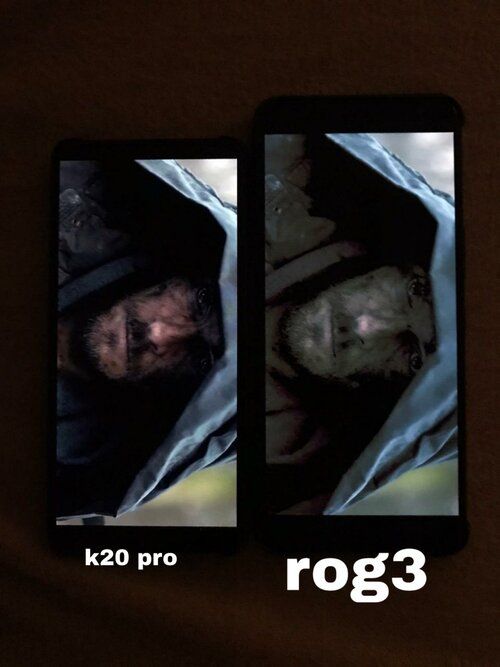
The term “black crush” usually refers to a certain condition where a display panel outputs inconsistent colors and severely pixelated blocks while rendering blacks on the screen. When it comes to the display of the ASUS ROG Phone 3, there are several reports about such anomalies regarding the color output on our own forums, the ASUS ZenTalk Community, and other online platforms.

asus_rog_phone_3_black_crush

Redmi K20 Pro (left) vs ASUS ROG Phone 3 (right); Thanks to ZenTalk user Cpz for the image!

According to a moderator of the ZenTalk Community, the black crush issue, especially when watching videos on Netflix, has its roots in the automatic brightness algorithm. ASUS is now trying to tackle the situation with a new firmware that contains a dedicated fix for the “conflict between Netflix app and System brightness function”. The complete changelog of this update can be found below:

  • Armoury Crate now also supports portrait mode. Added ROG Connect community.
  • Enabled Telia VoLTE/VoWiFi in Norway, Sweden and Finland
  • Fixed the conflict between Netflix app and System brightness function
  • Fixed not able to detect ROG Strix Arion SSD issue from bottom USB port
  • Fixed a large difference between the total power consumption items under the battery page and the actual power display in the status bar.

ASUS ROG Phone 3 XDA Review: The King of Gaming Smartphones is back

The new OTA is being rolled out incrementally to users. In case you haven’t received the update notification yet and you don’t want to wait for it, you can download the full package from the link below and manually flash it on your device.

Download software version 17.0823.2007.58 for the ROG Phone 3

The post ASUS updates the ROG Phone 3 with “black crush” fix, adds portrait mode support in Armoury Crate appeared first on xda-developers.


from xda-developers https://ift.tt/2GaVmxQ
via IFTTT

Best Galaxy Z Fold 2 Deals: How to pre-order Samsung’s new foldable

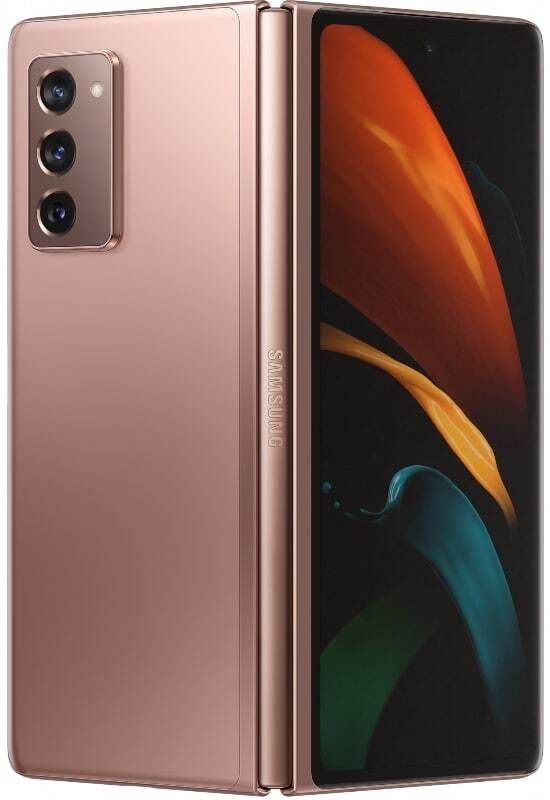
It took Samsung a few weeks, but in a short event today, the company finally launched the new Galaxy Z Fold 2. First shown off last month alongside the launch of the Galaxy Note 20 Ultra, the Galaxy Z Fold 2 brings several improvements including a new hinge that can be stopped at any angle, a wider front screen, a pinhole camera instead of that awful notch, and far more. There are also optimizations thanks to close partnerships with Google, where Duo and YouTube display controls on half the screen and video on the other half, and Microsoft, where you can work on a Powerpoint and Excel sheet side-by-side from within the Office app.

The new Galaxy Z Fold 2 launches on September 18 in the US at a price of $1,999. Although very expensive, it’s priced at $20 more than the price of the original Galaxy Fold, despite the vast range of improvements it brings. You can learn about the new Galaxy Z Fold 2 features here, and below let’s take a look at the best Galaxy Z Fold 2 deals and pre-order offers.

Best Samsung Galaxy Z Fold 2 Deals in the US

In the US, the Galaxy Z Fold 2 comes with a year of Galaxy Z Premier service, which includes a FoundersCard membership, on-call concierge, and more. It launches September 18 for $1,999 and you can customize the color of the hinge to make the Galaxy Z Fold 2 truly yours.

Samsung: Unlocked

Samsung is doing things differently with the Galaxy Z Fold 2, allowing you to customize it and truly make it your own. You have a choice of hinge colors so you can get creative with the style of your phone. If you place a pre-order, you can get up to $800 credit when you trade-in the Galaxy Fold or Galaxy Z Flip, or up to $650 with other devices. You also get $50 instant credit when you pre-order, which can be used on accessories and other items.

    Up to $800 instant trade-in credit at Samsung
    Forget the rest of the deals – if you want to save a bundle on your unlocked Galaxy Z Fold 2 and have a recent phone, Samsung's trade-in offer is the best. You can get up to $650 credit and if you have the original Z Flip or Galaxy Fold, you can save $800 on your new Galaxy Z Fold 2!

Best Buy: Unlocked, or on Verizon

Best Buy is also offering the Galaxy Z Fold 2 unlocked or on a payment plan with Verizon. It’s not available to order yet, but pre-orders launch in just a few hours. If you activate when checking out, you can get it for $1,949, while on Verizon, it starts at $83.33 per month for 24 months. Best Buy is also offering up to $800 instant credit, but I’ve used both and Samsung’s instant credit solution is far easier.

    From $1,949 at Best Buy
    If you want to save on the Galaxy Z Fold 2 and don't have a trade-in, Best Buy will give you a small discount for activating at time of sale. Best Buy is offering the Galaxy Z Fold 2 either unlocked or on Verizon, in both Mystic Black and Mystic Bronze.

Best Samsung Galaxy Z Fold 2 Carrier Deals in the US

Of course, some major carriers are also selling the Galaxy Z Fold 2. Here are the best deals for each of them:

Verizon

Pre-orders for the Galaxy Z Fold 2 on Verizon go at 3am ET on September 2, and the phone ships on September 18. On Verizon’s standard device payment program, the Galaxy Z Fold 2 will cost you $83.33 per month over 24 months ($1999 retail price). Some of Verizon’s pre-order offers include:

  • Get up to $550 off when you add a line and purchase a Samsung Galaxy Z Fold2 5G and trade in your old smartphone on a Premium Unlimited Plan.
  • As an added bonus, if you switch to Verizon you can get a $150 Verizon eGift Card when you purchase a Galaxy Z Fold2 5G on the Verizon device payment plan.
  • Upgrade and get up to $250 off when you purchase a Samsung Galaxy Z Fold2 5G and trade in your old smartphone on a Premium Unlimited Plan.
  • Get 25% off all Samsung Galaxy Z Fold2 5G cases, screen protectors, and charging accessories during the pre-order period, including new cases and screen protectors from Gear4, Zagg, and Samsung.
    Galaxy Z Fold 2 | $83.33 per month at Verizon
    Get the full power of Verizon's 5G mmWave network with the Galaxy Z Fold 2. Verizon has a range of pre-order offers available, and you can save on accessories too.

AT&T

AT&T has a dedicated landing page that you can visit from tonight to pre-order your Galaxy Z Fold 2. Pre-order offers will be confirmed when pre-orders commence on September 2. We do know already that the phone will be available on AT&T Next plan for $66.67 per month on a 30-month payment plan.

    Galaxy Z Fold 2 | $66.67 per month at AT&T
    If you're on AT&T and want the Galaxy Z Fold 2, it's available for just $66.67 per month on a new 30-month payment plan. There's pre-order offers available as well, hit the button to find out more!

Remember to bookmark this page as we’ll keep it updated as we find out more deals!

The post Best Galaxy Z Fold 2 Deals: How to pre-order Samsung’s new foldable appeared first on xda-developers.


from xda-developers https://ift.tt/3lGZlT2
via IFTTT

Samsung launches the Galaxy Z Fold 2 foldable for $2000, on sale September 18

Earlier last month at Unpacked, Samsung teased the Galaxy Z Fold 2 to the world. This is the next generation of the Galaxy Fold series, one of Samsung’s most controversial device series in recent memory. After it’s original launch in April 2019 and a 6-month delay, Samsung finally managed to release it. It quickly became one of the most loved devices among reviewers and consumers alike. A short 6 months later, Samsung released the Galaxy Z Flip with a new hinge, display, design, and more — and this foldable also quickly became loved by reviews and consumers alike. Samsung is now launching the Galaxy Z Fold 2 with all of the improvements, and more, of the Galaxy Z Flip in the Galaxy Fold form factor.

Samsung Galaxy Z Fold 2 XDA Forums

Samsung Galaxy Z Fold 2: Specifications

Specification Samsung Galaxy Z Fold 2
Dimensions & Weight
  • Folded: 159.2 x 68 x 16.8 mm
  • Unfolded: 159.2 x 128.2 x 6.9 mm
  • 282g
Display
  • Outer Display:
    • 6.23″ HD+ Super AMOLED
    • 2,260 x 816 pixels
    • 25:9 aspect ratio
    • Infinity-O
    • 60Hz refresh rate
    • HDR10+ support
  • Inner Display:
    • 7.6″ FHD+ Dynamic AMOLED 2X
    • 2,208 x 1,768 pixels
    • 22.5:18 aspect ratio
    • Infinity-O
    • 120Hz refresh rate
    • Dynamic refresh rate
    • HDR10+ support
SoC Qualcomm Snapdragon 865 Plus:
  • 1x Kryo 585 (ARM Cortex-A77-based) Prime core @ 3.1GHz
  • 3x Kryo 585 (ARM Cortex-A77-based) Performance core @ 2.4GHz
  • 4x Kryo 385 (ARM Cortex A55-based) Efficiency cores @ 1.8GHz

Adreno 650 (10% overclock)

RAM & Storage 12GB LPDDR5 + 256GB UFS 3.1
Battery & Charging
  • 4,500 mAh
  • 25W wired fast charging
  • 11W wireless charging
  • Reverse wireless charging
Fingerprint sensor Side-mounted fingerprint scanner
Rear Camera
  • Primary: 12MP, f/1.8, OIS
  • Secondary: 12MP, f/2.2, ultra-wide-angle
  • Tertiary: 12MP, f/2.4, telephoto
Front Camera
  • Folded: 10MP, f/2.2, fixed focus
  • Unfolded: 10MP, f/2.2, fixed focus
Other Features
  • Folding design
  • 5G: SA, NSA, mmWave
  • NFC
  • MST
Android Version Android 10 with One UI

At Unpacked 2020 last month, Samsung had barely touched upon the Galaxy Z Fold 2. The specifications that we had were from our own sources, but it’s good to know that all of them were on point. We recommend checking out our original Galaxy Z Fold 2 coverage for a finer look at the design and specifications.

Samsung Galaxy Z Fold 2

Pricing and Availability

Today’s announcement from Samsung focuses on the pricing and availability details of the next-generation foldable.

USA

The Samsung Galaxy Z Fold 2 5G will be available in carrier and Unlocked versions through Samsung.com, carriers, and select online retailers. The phone will be available in Mystic Bronze, and Mystic Black colors, in a single 12GB + 256GB variant, for $1999.99. You can customize the hinge color on Samsung.com and choose from these four colors: Metallic Silver, Metallic Gold, Metallic Red, and Metallic Blue.

Samsung Galaxy Z Fold 2 Hinge colors

Pre-orders for the Galaxy Z Fold 2 5G begin from September 2, 2020, from midnight, alongside the Thom Browne edition.

Original Galaxy Fold and Galaxy Z Flip customers can trade-in their device to get the Galaxy Z Fold 2 for as low as $25/month with up to $800 trade-in value. Samsung also mentions that users can save up to $650 on trade-ins of other eligible devices. Samsung is also offering a Guaranteed Buyback program where users can pay 50% of the full retail price over 20 monthly payments, and then get 50% back once the device is returned in good condition. The wording on the offer is confusing, so we’ll update the post with a clarification when we have some from Samsung.

Samsung is also offering Samsung Care+ for an additional $11.99 per month, giving you an extended warranty, coverage for accidental damage, and $29 discounted screen repairs. Then there is also the Galaxy Z Premier Service, which is on-demand concierge support which allows them to connect one-on-one with experts and also get exclusive VIP benefits like membership to a Founders Card, access to a prepared meal from a Michelin star restaurant, and access to an elite fairway golf and country club program at clubs across the USA.


What are your thoughts on the Samsung Galaxy Z Fold 2’s pricing? Will you be purchasing one? Let us know in the comments below!

The post Samsung launches the Galaxy Z Fold 2 foldable for $2000, on sale September 18 appeared first on xda-developers.


from xda-developers https://ift.tt/3jCutRM
via IFTTT

lundi 31 août 2020

Walmart+ is the subscription alternative to Amazon Prime, will cost $98 per year

Walmart is insanely popular in the USA, proudly wearing the tag of being one of the biggest supermarket chains in the country. Now, Walmart is looking to take on Amazon Prime with its own subscription program, Walmart+, offering free deliveries and discounted gas to members who subscribe.

Walmart+ goes live for users in the USA on September 15, 2020. According to a report from The Washington Post, Walmart+ is the most direct attempt from the supermarket chain to compete against the popularity of Amazon’s Prime membership program. Walmart+ will reportedly cost $12.95 per month, or $98 if you opt for the annual subscription. In comparison, Amazon Prime costs $12.99 per month or $119 annually.

With Walmart+, members will receive unlimited free deliveries on orders from any of the retailer’s 4,700 stores across the USA, and up to 5 cents of discount per gallon of gasoline at Walmart, Murphy USA, and Murphy Express fuel stations. The membership also enables the “Scan & Go” feature in the company app, allowing customers to scan items as they shop and then check out using Walmart Pay.

Walmart will initially be offering around 160,000 items with free delivery eligibility, ranging across toys, electronics, and groceries. In comparison, Amazon Prime offered more than 10 million items for free one-day delivery, which explains why Prime boasts of 100 million subscribers. Amazon Prime also offers a bunch of other perks under its membership program, including Prime Video, Prime Music, and Prime Gaming. Walmart’s USP, on the other hand, is its wide network of stores, which could help the company scale up timely deliveries despite the COVID-19 disruptions. Walmart also has a better focus on groceries and essentials, two segments that have perennially received attention but have seen an increased influx during the pandemic. If the program does take off, we can expect to see more perks added along the way.


Source: The Washington Post

The post Walmart+ is the subscription alternative to Amazon Prime, will cost $98 per year appeared first on xda-developers.


from xda-developers https://ift.tt/34SucpU
via IFTTT